Manage Your Loan Journey with the SMFG India Credit mConnect 2.0 App

The new and improved SMFG India Credit mConnect App brings together essential loan services in one convenient mobile application, whether you’re an existing customer or simply exploring our product offerings.

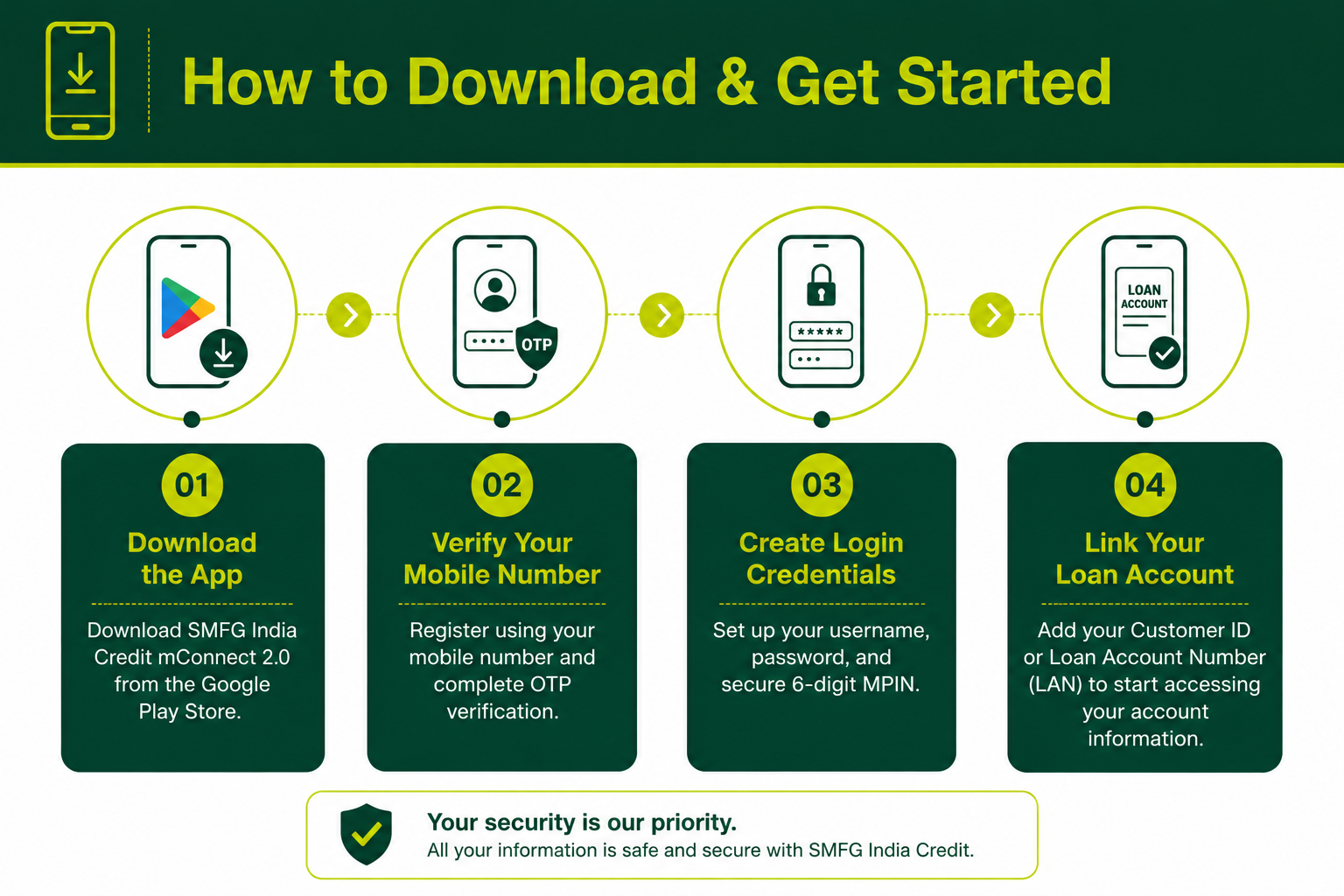
If you have an active loan account with us, you can securely link your Customer ID or Loan Account Number (LAN) to view loan account details, make EMI payments, access important documents, and raise service requests without visiting a branch.

With secure login options, real-time access to key loan information, and an easy-to-use interface, managing your loan account is quicker and more convenient.

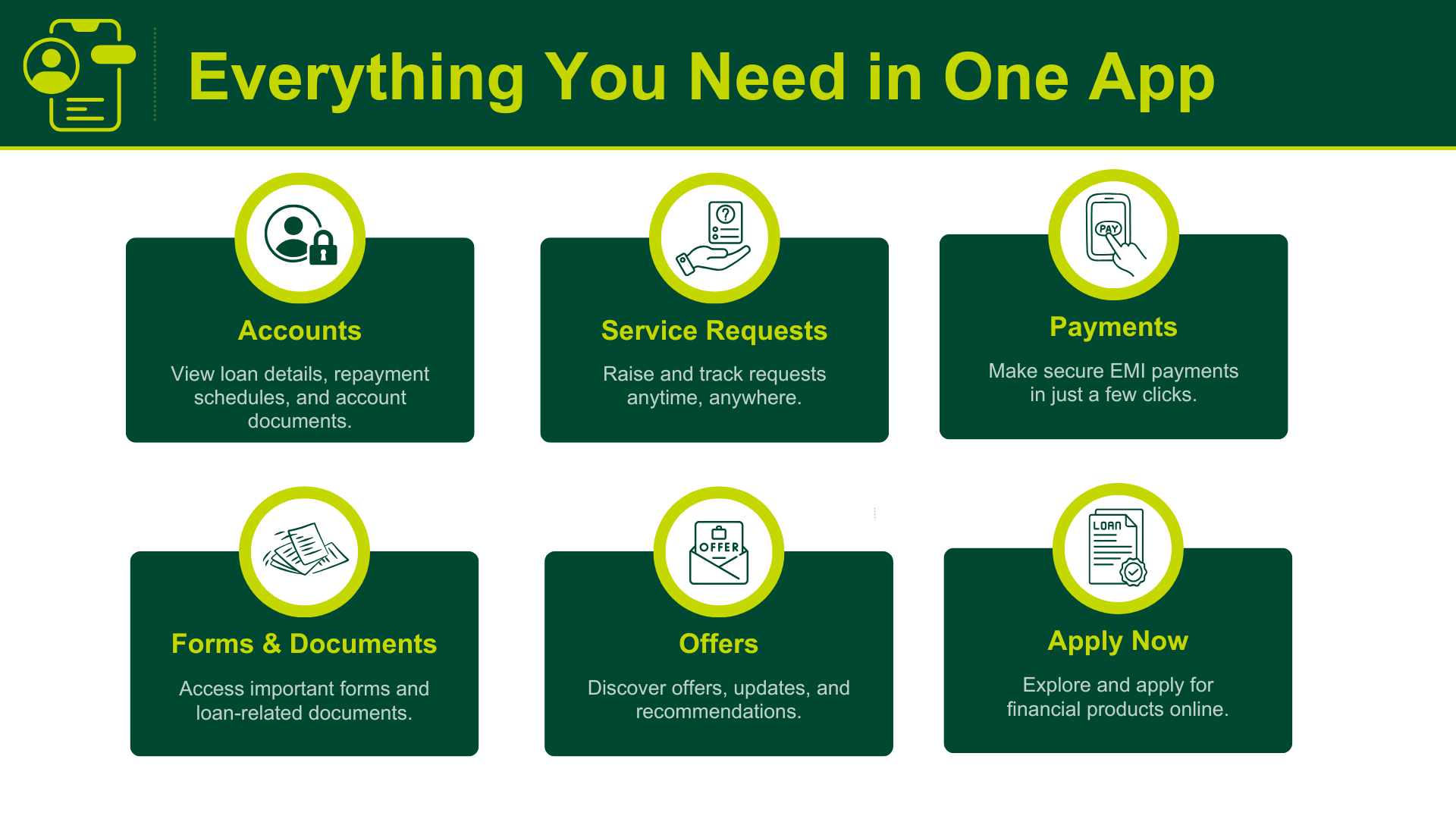
Everything You Can Do with the SMFG India Credit mConnect 2.0 App

Track Your Loan Details

View the amount disbursed, tenure in months, interest rate, EMI information, repayment schedule, and more loan details.

Make EMI Payments

Pay your outstanding dues quickly and conveniently through a secure Payment Gateway.

Access Loan Documents

Download/email your Statement of Account, Repayment Schedule and raise service requests for documents such as the Interest Certificate, Loan Agreement, and No Due Letter.

Raise & Track Service Requests

Create service requests and track their status directly within the app.

Explore Loan Products

Browse SMFG India Credit and SMFG Grihashakti product offerings, including personal loans, business loans, and home loans.

Personalise Your Experience

Set up biometric login, link/delink your loans, choose your preferred language, and manage more profile settings.

Tax Refund Delay in 2026? Causes and What You Can Do

Benefits of the SMFG India Credit mConnect 2.0 App  

The SMFG India Credit mConnect App simplifies everyday loan management by bringing essential services and information together in one place.

  • Complete common loan servicing tasks digitally, wherever you are
  • Stay updated with real-time access to important loan information
  • Access key loan documents without the need to visit a branch
  • Raise and track service requests conveniently through the app
  • Manage multiple active loan accounts from a single place
  • Explore SMFG India Credit's and SMFG Grihashakti’s range of financial products at your convenience
  • Pay your loan EMIs securely and conveniently

How to Download & Get Started with the SMFG India Credit mConnect 2.0 App 

Getting started is quick and simple. Download the app, complete a few registration steps, and start accessing your loan information and services from your smartphone.

mConnect App steps

Download the SMFG India Credit mConnect 2.0 App

Download the app from Google Play and conveniently view your loan information, make payments, access important documents, raise service requests, and manage your loan account from your smartphone.

Download on Google Play

Need Assistance?

If you have any questions about the app or your loan account, write to us or contact our Helpline.

For SMFG India Credit Customers

Email: [email protected]

Toll-Free: 1800 103 6001

Hours: Monday to Saturday, 9:00 am – 7:00 pm
(Excluding public holidays and the fourth Saturday of every month)

FAQs

What is the SMFG India Credit mConnect app?

The SMFG India Credit mConnect is a mobile application that lets you explore our range of financial products while providing convenient access to your loan account(s). Through the app, you can view loan-related information, make EMI payments, raise service requests, access important loan documents, and complete various account-related activities from your smartphone.

Can anyone use the SMFG India Credit mConnect app?

Anyone with a valid Indian mobile number can download the mConnect app from Google Play and register using their mobile number. Once registered, you can log in using your MPIN or your username and password. If you have an active SMFG India Credit or SMFG Grihashakti loan account, you can link your Customer ID or Loan Account Number (LAN) to access your loan account details through the app.

What services can I access through the SMFG India Credit mConnect app?

The SMFG India Credit mConnect app lets you explore our wide range of product offerings and access important loan account information without visiting a branch. You can also complete a range of account-related activities, including raising service requests, making EMI payments, accessing loan-related documents, and checking insurance details.

Which smartphone versions support the SMFG India Credit mConnect app?

The SMFG India Credit mConnect app is compatible with smartphones running Android 12 or above.

Where can I download the SMFG India Credit mConnect app?

To install the SMFG India Credit mConnect app, simply search for it on the Google Play Store and download it to your Android device.

How do I register for the SMFG India Credit mConnect app?

To register, enter your 10-digit mobile number and verify it using the 6-digit OTP sent to your registered mobile number. The app can auto-read the OTP, or you can enter it manually.

Once your mobile number is verified, create your username and password as per the password policy, then set a 6-digit MPIN to access the app. After completing the registration process, you will be redirected to the login page. If you have already registered, simply log in using your MPIN or your username and password.

How do I log in to the SMFG India Credit mConnect app?

After you have completed the registration process, the login screen will appear subsequently when you open the app. You can log in using your 6-digit MPIN or your username and password. 

On your first login, you'll be prompted to complete your profile, including entering your first and last name. You can also enable Fingerprint/Biometric login, if preferred, and link your Customer ID or Loan Account Number (LAN) to access your loan account details. You may skip this step to complete it later and directly access the Dashboard. 

At any time, you can update your profile, reset your MPIN or password, upload a profile photo, manage Fingerprint/Biometric settings, and link additional Customer IDs through the “My Profile” section.

How long will it take to download the SMFG India Credit mConnect app?

The download time depends on the speed of your mobile data or internet connection provided by your network or internet service provider.

Can someone else access my SMFG India Credit mConnect app?

No. The SMFG India Credit mConnect app is designed for individual use and includes security features to help protect your account. The app automatically locks after five consecutive incorrect MPIN or password attempts. To keep your account secure, never share your Customer ID, MPIN, or password with anyone.

Do I have to pay to download or use the SMFG India Credit mConnect app?

No. The app is free to download and use. However, your mobile network operator or internet service provider may apply charges for mobile data or SMS services, depending on your plan. Please check with your service provider for the applicable charges.

Can I continue using the SMFG India Credit mConnect app if I change my mobile number or handset?

Yes. If you change your handset, simply download the SMFG India Credit mConnect app again, verify your mobile number using the OTP sent to your registered mobile number, and log in using your existing MPIN or username and password. 

If you change your registered mobile number, you need to first update it with SMFG India Credit or SMFG Grihashakti, as applicable. Once updated, you can register for the app again using your new mobile number.

What should I do if I don't receive the OTP?

Tap "Resend OTP" on the OTP verification screen. You can request the OTP up to five times. If you reach this limit, you'll be able to request a new OTP after 2 hours.

In case you still don't receive the OTP:

  • Check if your mobile number is registered under Do Not Disturb (DND) with your mobile network operator.
  • Make sure you have a stable mobile network.

Which OTP should I use if I receive more than one?

If you receive multiple OTPs, use the latest OTP for registration or authentication.

What steps should I take if I’ve forgotten my MPIN or password?

If you've forgotten your MPIN or password, select "Forgot MPIN" or "Forgot Password" on the login screen and follow the on-screen instructions to reset your credentials.

What should I do if my app gets locked after entering the wrong MPIN or password?

Your MPIN or password will be locked if you enter the incorrect value multiple times. To regain access, select "Forgot MPIN" or "Forgot Password" and follow the on-screen instructions to reset your credentials.

Can I use the SMFG India Credit mConnect app while roaming?

Yes. You can use the app while roaming, provided mobile data is enabled and you have a stable network connection. However, your mobile network operator may apply roaming data charges. Please check with your service provider for details about the applicable charges.

What should I do if I lose my mobile phone?

If you lose your mobile phone, you should first register an FIR with the police and use it to obtain a duplicate SIM card from your mobile service provider. Once you have the replacement SIM, install it in your new phone, download the SMFG India Credit mConnect app again, and re-register using your Customer ID or Loan Account Number (LAN).

If you also want to change your registered mobile number, contact Customer Care to submit an update request. After your request is processed, you'll receive an email notification. You can then download and/or re-register for the app again with your new mobile number.

How can I reactivate the SMFG India Credit mConnect app after formatting my phone?

After formatting your phone, simply download the app again and verify your mobile number. You can then log in using your MPIN or username and password to continue using the app.

What should I do if I can't log in to the app despite using the correct credentials or changing the password?

If you're unable to log in even after entering the correct credentials or resetting your password, check the following:

  • Your app access may have been locked due to multiple unsuccessful login attempts.
  • Ensure you're entering the correct MPIN or username and password.
  • Verify that you're using a supported version of the SMFG India Credit mConnect app and Android operating system.
  • Make sure you have a stable mobile data or internet connection if the app isn't loading.

What should I do if I can't find my loan account details in the SMFG India Credit mConnect app?

When you log in for the first time, go to the “My Profile” section, enter your first and last name, and link your Customer ID or Loan Account Number (LAN). Once linked, your loan account details will be available in the app. If you skipped this step during your first login, you can link your Customer ID later through the “My Profile” section. You can also link multiple Customer IDs to access all associated loan accounts.

If you're still unable to view your loan account, raise an "Unable to Link Loan Account No" service request through the app or contact our Helpline.

For SMFG India Credit customers:
Call:
1800 103 6001 (Monday to Saturday, 9:00 am to 7:00 pm, excluding public holidays and the fourth Saturday of every month)
Email: [email protected]

How do I track the status of my service request?

Log in to the SMFG India Credit mConnect app and open the “Service Requests” section from the Dashboard. If applicable, select your Loan Account Number (LAN) to view your request status:

  • Open: Your request has been received.
  • In Progress: Your request is currently being processed.
  • Customer Input Pending: Additional information is required from you.
  • Closed: Your request has been completed.

You can also view the request creation date, expected completion date, and actual closure date (for completed requests).

If you've raised multiple requests, the most recent one will appear first.

You can use the available filters to search by Request Type or Status.

Note: If you don't have an active loan account, any and all updates related to your service request will be sent to the email address you provided.

What loan information can I view in the app?

Log in to the SMFG India Credit mConnect app, go to “Accounts” from the Dashboard, select the relevant Loan Account Number (LAN), and open the “Loan Details” tab. You can view information including:

  • Loan Account Number
  • Loan/Product Name
  • Loan Amount
  • Amount Disbursed
  • Loan Tenure
  • Loan Start Date
  • EMI Amount
  • EMI Start Date
  • Balance Tenure
  • Interest Rate
  • Next EMI Due Date
  • EMI End Date
  • Sanction Date
  • Loan Restructuring Status (if applicable)
  • Applicant Details (Name, Mobile Number, and Email ID)
  • Moratorium/Grace Period Details (if applicable)
  • Month-wise Moratorium Information
  • Collateral/Security Details (if applicable)

How can I get my Statement of Account?

Follow these steps to download or email your Statement of Account:

  1. Log in to the app and open the “Accounts” section from the Dashboard.
  2. Select the Loan Account Number (LAN).
  3. Go to the “Documents” tab.

From here, you can:

  • Save your Statement of Account to your device.
  • Send it to your registered email ID.
  • Raise a service request if the Statement of Account isn't immediately available for download or email.

Can't generate your Statement of Account? Simply submit a service request through the app. After it's created, you can check its progress from the “Service Requests” section.

What loan documents can I access through the SMFG India Credit mConnect app?

You can access your loan documents by following these steps:

  1. Sign in to the app.
  2. Select “Accounts” from the Dashboard.
  3. Choose the relevant Loan Account Number (LAN).
  4. Navigate to the “Documents” tab.

Your documents are organised into the following categories:

Loan Related

  • Statement of Account
  • Loan Agreement Copy

Repayment Related

  • Payment Mandate
  • Repayment Schedule
  • Interest Certificate

Loan Closure

  • No Due Letter

You can download your Statement of Account directly or send it to your registered email ID. If it isn't available at the time of your request, you can raise a service request through the app.

How can I raise a service request through the SMFG India Credit mConnect app?

Follow these steps to create a service request:

  1. Log in to the app and open the “Service Requests” section from the Dashboard.
  2. Select “Create”.
  3. Choose your Loan Account Number (LAN) and loan type.
  4. Select the relevant request type.
  5. Fill in the required information.
  6. Review the details by selecting “Continue”.
  7. Select “Submit” to complete your request.

You can modify the details before submitting your request. Once it has been submitted, it cannot be edited.

Note: If you don't have an active or closed loan account, simply choose the required request type, provide the necessary details, and enter your email ID.

If your email ID isn't registered with us, you'll need to update it. You can do this through the "Update Email ID" service request in the app or by contacting our Helpline.

For SMFG India Credit customers:
Call:
1800 103 6001 (Monday to Saturday, 9:00 am to 7:00 pm, excluding public holidays and the fourth Saturday of every month)
Email: [email protected]

How can I make EMI payments through the SMFG India Credit mConnect app?

To make an EMI payment through the app:

  1. Log in and open the “Payments” section from the Dashboard quick links. Alternatively, go to “Accounts” and select “Payments” (if your loan status is selected as Active).
  2. Select the relevant Loan Account Number (LAN), if it isn't already selected. You'll then be able to view your loan details and any pending amount due.
  3. Select “Make Payment” and review the payment details, including your Loan Account Number, payment amount, name, and mobile number.
  4. You'll be redirected to the Payment Gateway to complete the transaction. If needed, you can use the “Edit/Back” option to review or update the details before proceeding.

Please keep in mind that your payment may take up to 2 business days to reflect in our system. Kindly consider this processing time while making your payment through the app.

Read MoreRead Less