Masked Aadhaar is a safer version of your regular Aadhaar card that hides the first eight digits of your 12-digit number, leaving only the last four visible. In simple terms, the meaning of a masked Aadhaar is that it lets you prove your identity without exposing the full Aadhaar number.
With rising data privacy concerns in India and a sharp increase in identity theft cases, Aadhaar masking has become one of the easiest ways to protect yourself when sharing personal documents. What is masked Aadhaar, when to use it, and how to download it are the three questions this guide answers in full.
What Is Masked Aadhaar?
A masked Aadhaar card is an electronic version of your Aadhaar issued by the Unique Identification Authority of India (UIDAI), where the first eight digits of your Aadhaar number are replaced with "XXXX-XXXX" and only the last four digits remain visible.
The masked Aadhaar card's meaning goes beyond a simple privacy filter: the document still carries your photo, QR code, name, address, and digital signature from UIDAI, so it remains a legally valid ID proof under the Aadhaar Act, 2016.
How Does Masked Aadhaar Work?
The masked Aadhaar works through a secure digital process on the UIDAI portal. You enter your 12-digit Aadhaar number or virtual ID, complete OTP verification using your registered mobile number, and select the masked option before downloading. UIDAI then generates a password-protected PDF document in which the first 8 digits are hidden from view.
The QR code on the file still contains your complete verified data, so any authorised verifier can scan it for authentication. The digital signature from the Government of India confirms the file has not been altered, giving you secure authentication without revealing your full Aadhaar.
When Should You Use Masked Aadhaar?
You should use a masked Aadhaar any time a service provider needs proof of your identity but does not require your full Aadhaar number on record.
Here are some situations when you can use masked Aadhaar:
- Checking into a hotel or guest house
- Submitting documents for a job application
- Collecting parcels or couriers that need ID verification
- Booking train or flight tickets where ID proof is needed at the counter
- Signing up for a gym, library, or co-working space
- Sharing with landlords or property agents for rental verification
- Applying for certain credit products, such as a personal loan (subject to lender requirements)
In each of these cases, the last four digits are enough to match your identity with the document. Sharing your full Aadhaar here would expose more information than the situation calls for, which is what masked Aadhaar prevents.
Where Can Masked Aadhaar Be Used?
The masked Aadhaar uses cover a wide range of daily and institutional scenarios across India. You can use it with:
- Telecom operators for SIM card issuance (only where Aadhaar is accepted as ID, not for mandatory e-KYC)
- Educational institutions for admission paperwork
- Travel and ticketing agencies
- Housing societies for visitor or tenant records
- E-commerce delivery verification
- As part of financing paperwork, such as personal loan documents (subject to lender policies)
- Government schemes where Aadhaar serves as a supporting ID, not as the primary linked document
The Aadhaar card security that the masked version provides makes it the preferred format for shared or photocopied submissions.
Can Masked Aadhaar Be Used for e-KYC?
Wondering what is the e-KYC guideline for masked Aadhaar?
This is one of the most common questions, and the answer has two parts. Masked Aadhaar for KYC works well for offline verification and for services that accept Aadhaar only as identity proof. For full e-KYC, where the verifier needs to authenticate your Aadhaar directly with UIDAI, you generally need your regular Aadhaar or the virtual ID, as the system requires the complete 12-digit number to fetch your demographic data.
In essence, the masked Aadhaar validity stands for identity proof purposes, but for regulated services like bank account opening or filing taxes, you may be asked for full Aadhaar details to complete the KYC process.
Benefits of Masked Aadhaar
The Aadhaar masking benefits are practical and directly linked to your data safety. Here is what you gain by using a masked Aadhaar card instead of the regular version:
- Data Privacy: The first eight digits are hidden, so even if the document falls into the wrong hands, your full Aadhaar number stays safe.
- Identity Protection: Reduces the risk of misuse in phishing, SIM card fraud, or unauthorised loan applications.
- Safe Sharing: Ideal for scenarios where you need to send a soft copy over email or messaging apps.
- Same Legal Validity: Accepted as a valid ID proof under the Aadhaar Act, 2016, just like the regular version.
- Free to Download: UIDAI does not charge any fee, and you can download it as many times as you need.
- QR Code Verification: Verifiers can still confirm authenticity using the embedded QR code.
The Aadhaar privacy protection these benefits deliver makes masked Aadhaar one of the simplest security upgrades available to Indian residents.
Key Points to Remember About Masked Aadhaar Card
Keep these Aadhaar masking rules in mind before you start using it:
- It is issued only by UIDAI, not by any third-party provider.
- The last four digits of your Aadhaar number remain visible on the document.
- The PDF is password-protected using a format set by UIDAI.
- The digital signature from UIDAI must remain valid (check this when opening the PDF).
- It is accepted as valid ID proof, but may not work for full e-KYC.
- It has no separate expiry date and stays valid as long as your Aadhaar is active.
- Your mobile number must be linked with Aadhaar to receive the OTP for download.
Difference Between Regular Aadhaar and Masked Aadhaar
The regular Aadhaar and masked Aadhaar difference comes down to how much of your Aadhaar number is visible and the situations each is suited for. Here is a quick comparison:
|
Feature
|
Masked Aadhaar
|
Regular Aadhaar
|
|
Aadhaar number visibility
|
Only the last 4 digits are visible
|
All 12 digits visible
|
|
Privacy level
|
High
|
Standard
|
|
Suitable for
|
Identity proof, offline sharing
|
Full KYC, banking, and benefit linkage
|
|
Legal validity
|
Same as regular Aadhaar
|
Same as masked Aadhaar
|
|
Issued by
|
UIDAI
|
UIDAI
|
|
QR code included
|
Yes
|
Yes
|
|
Download cost
|
Free
|
Free
|
The masked Aadhaar vs regular Aadhaar choice depends on what the verifier needs, not on which document is more authentic.
How to Get Masked Aadhaar?
You can complete your masked Aadhaar download through three official routes: the UIDAI portal, the DigiLocker app, and the mAadhaar app. All three are free, and the document you get from each is equally valid. The most common method is the UIDAI website, since it does not require app installation.
You need your Aadhaar number or virtual ID, your registered mobile number to receive the OTP, and a PDF reader to open the downloaded file. If you do not yet have an Aadhaar, you first need to apply for an Aadhaar card through an enrolment centre before you can download any version of it.
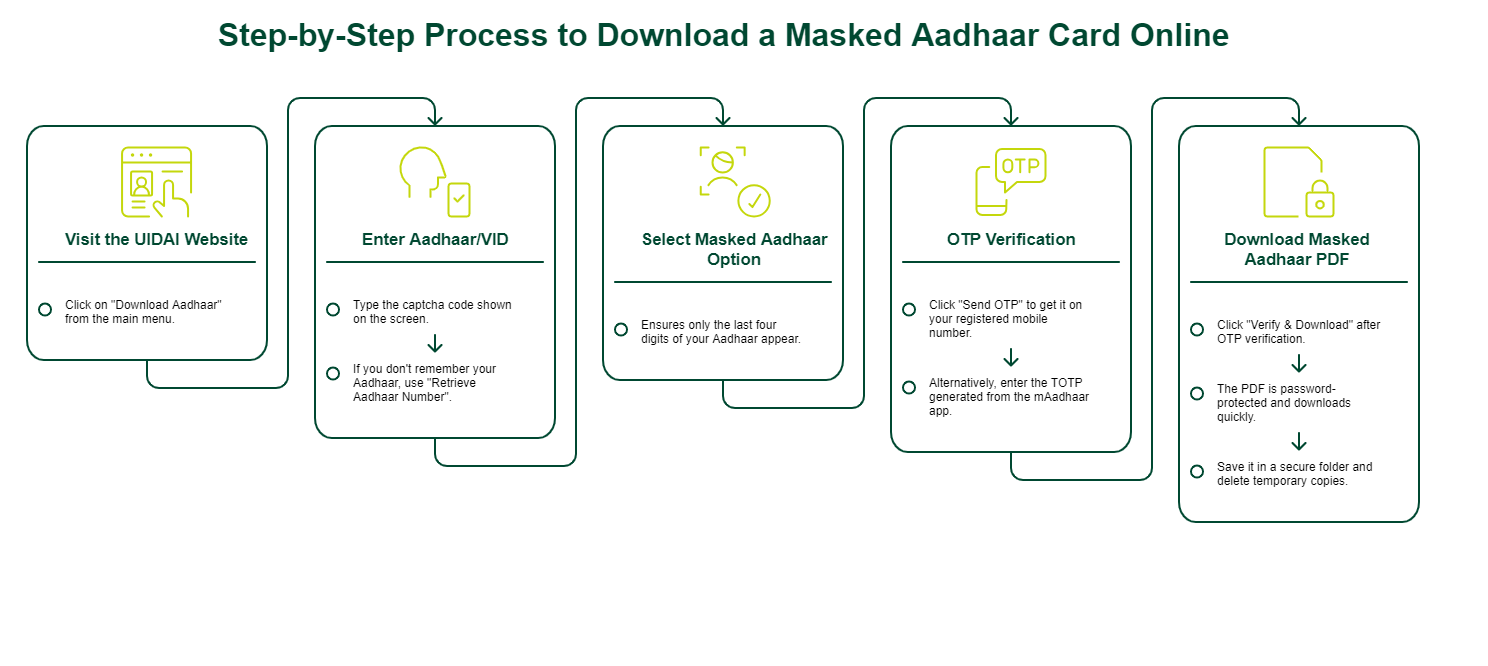
Step-by-Step Process to Download a Masked Aadhaar Card Online
The download masked Aadhaar online process through the UIDAI portal takes only a few minutes. Here is the full masked Aadhaar download sequence, broken into clear steps.
Step 1: Visit the UIDAI Website
Open your browser and go to the official UIDAI portal. This is the only authorised website for the Aadhaar download process, so avoid third-party sites that claim to offer the same service. On the homepage, click on "Download Aadhaar" from the main menu to start.
Step 2: Enter Aadhaar/VID
On the next page, enter your 12-digit Aadhaar number, your 16-digit Virtual ID (VID), or your 28-digit Enrolment ID, depending on what you have. Type the captcha code shown on the screen for masked Aadhaar input verification. If you do not remember your Aadhaar number, use the "Retrieve Aadhaar Number" option first.
Step 3: Select Masked Aadhaar Option
You will see a checkbox along the lines of "Do you want a masked Aadhaar?" Tick this box to ensure only the last four digits of your Aadhaar number appear on the downloaded file. If you skip this step, the portal will generate the regular version instead of the masked one.
Step 4: OTP Verification
Click "Send OTP" to receive a one-time password on your registered mobile number. Enter the OTP in the field provided. Alternatively, you can click on the 'Enter TOTP' button to use the time-bound OTP (TOTP) generated from the mAadhaar app if you have it set up. A secure download depends on this verification step, so make sure your mobile number is linked to Aadhaar.
Step 5: Download Masked Aadhaar PDF
After OTP verification, click "Verify & Download" to save the PDF to your device. The file is password-protected and downloads quickly on a standard internet connection. Save it in a secure folder on your device, and delete any copies from temporary download locations once you have moved it. This completes the download masked Aadhaar card PDF process.
How to Download Masked Aadhaar via DigiLocker
DigiLocker is a cloud-based document platform run by the Government of India, and it stores your masked Aadhaar alongside other official records. For the Aadhaar DigiLocker download:
- Download the DigiLocker app from the Google Play Store or Apple App Store, or visit digilocker.gov.in.
- Sign up or log in using your mobile number and create a security PIN.
- Link your Aadhaar by entering the 12-digit number and completing OTP verification.
- Go to "Issued Documents" and select your Aadhaar.
- Tap the download icon to save the masked version as a PDF.
How to Download via mAadhaar App
The mAadhaar app from UIDAI is the mobile-first way to get your masked Aadhaar card whenever you need it. The mAadhaar app Aadhaar download works like this:
- Install the mAadhaar app from the Google Play Store or Apple App Store.
- Open the app and select your preferred language.
- Enter your registered mobile number and complete OTP verification.
- Tap "Register Aadhaar" and create a four-digit PIN for profile access.
- Once your profile loads, go to "Download Aadhaar" and choose the masked option.
- Enter the captcha, verify through OTP or TOTP, and save the file.
Password for Masked Aadhaar PDF
The Aadhaar PDF password is a standard format set by UIDAI and works the same way across the portal, DigiLocker, and the mAadhaar app. The masked Aadhaar password is made up of the first four letters of your name (in capitals) followed by your birth year in YYYY format.
For example, if your name is Rajesh and you were born in 1988, your password is RAJE1988. If your first name has fewer than four letters, use all the letters along with your birth year. For instance, if your name is Ria and you were born in 1995, the password would be RIA1995.
How Masked Aadhaar Helps in a Personal Loan Application
A masked Aadhaar allows lenders to verify your identity quickly without exposing your full Aadhaar number, striking a balance between security and convenience. It supports basic KYC requirements in many cases and can streamline the initial stages of an application, improving your personal loan eligibility by ensuring accurate and secure documentation.
For a stronger application, you should also keep income proof, bank statements, and a good credit score ready. These factors influence lender confidence and help you secure financing at a more favourable personal loan interest rate, as they reflect your repayment capacity and financial discipline.
Things to Keep in Mind While Using Masked Aadhaar
A few masked Aadhaar precautions help you get the most out of the document while keeping your personal information safe:
- Share the file only with trusted verifiers and over secure channels.
- Do not post screenshots or photos of your masked Aadhaar on social media, even with digits hidden.
- Verify the digital signature is valid each time you open the PDF.
- Confirm with the verifier in advance if they accept the masked version.
- Keep your registered mobile number active, since OTP is needed for every fresh download.
- Store the PDF in a password-protected folder on your device.
- Delete older copies you no longer need to reduce exposure.
Common Issues and Solutions While Downloading
If you run into masked Aadhaar download issues, here are the most common problems and what to do about them:
- OTP Not Received: Check that your mobile number is linked with Aadhaar. If you have changed your number, you need to update your mobile number in Aadhaar at an enrolment centre first.
- Captcha Errors: Refresh the page and re-enter the captcha carefully, as the field is case-sensitive.
- Server Down or Slow Loading: UIDAI servers typically see heavy traffic between 10 AM and 2 PM during working days; try downloading during off-peak hours.
- PDF Not Opening: Double-check the password format (first four letters of your name in capitals plus birth year).
- Digital Signature Shows Invalid: Install the latest version of Adobe Reader and validate the certificate through UIDAI's public certificate page.
- Wrong Version Downloaded: Make sure the "Do you want a masked Aadhaar?" checkbox is ticked before hitting download.
Conclusion
A masked Aadhaar card offers the same legal validity as the regular version while helping keep your full Aadhaar number private. It is free to download, quick to access through the Unique Identification Authority of India portal, DigiLocker, or the mAadhaar app, and can be used across many identity verification scenarios in India. Keeping a masked Aadhaar handy and following safe sharing practices can help reduce unnecessary exposure of your digital identity and personal information.
If you are planning to apply for a personal loan, SMFG India Credit offers funds of up to Rs. 10 lakhs* at competitive interest rates and flexible tenures. Use the personal loan EMI calculator to estimate your monthly repayments, review the required documents alongside Aadhaar, and apply online.
We also recommend using a personal loan eligibility calculator to understand how much you may be able to borrow and make more informed application decisions.