A misplaced Aadhaar card, forgotten Aadhaar number, or a lost enrolment slip can make it difficult to access services that require Aadhaar authentication. Fortunately, if you have a lost Aadhaar card number, you can retrieve Aadhaar number details or recover a forgotten Aadhaar UID/EID through both online and offline methods provided by UIDAI. In many cases, the process requires access to your registered mobile number for identity verification.
This article explains the available retrieval methods, the information required, and the steps to recover your UID or EID quickly and securely.
What Are UID and EID in Aadhaar?
Before attempting to recover your Aadhaar details, it is important to understand the difference between UID and EID. Both are issued by UIDAI and serve different purposes.
- Aadhaar UID Meaning: The UID is the unique 12-digit Aadhaar number assigned after successful enrolment.
- Aadhaar EID Meaning: The EID, or enrolment ID, is generated when you enrol for Aadhaar or request an update. It is printed on the Aadhaar enrolment slip and helps track your enrolment or update status.
Knowing your UID/ details can make it easier to retrieve your Aadhaar information if your card or enrolment slip is lost.
When Do You Need to Retrieve Lost Aadhaar UID/EID?
You may need to recover your Aadhaar details in several everyday situations. Retrieving a lost Aadhaar enrolment ID helps ensure that important financial, tax, and government-related activities are not delayed. Common situations include:
- Your lost Aadhaar card needs to be replaced.
- You forgot Aadhaar number and need it for verification.
- Your Aadhaar enrolment slip has been misplaced.
- Aadhaar is required for KYC verification.
- Linking Aadhaar with PAN.
- Opening or updating a bank account.
- Accessing government services or benefits.
- Providing a valid identity proof for official purposes.
If you are applying for a credit product, such as a personal loan, keeping your Aadhaar details readily available can help complete identity verification and KYC requirements more efficiently during the application process.
Along with Aadhaar, maintaining complete documents such as PAN and income proof can support a smoother application process and may strengthen your personal loan eligibility.
Documents/Details Required to Retrieve Lost Aadhaar Number
Keeping the documents required to retrieve Aadhaar and the necessary details ready can help make the process quicker. Depending on whether you choose the online or offline method, you may need:
- Full name as per Aadhaar
- Aadhaar registered mobile number or email ID
- Access to the registered mobile number to receive the Aadhaar OTP
- The OTP and CAPTCHA for online verification
- Biometric verification at an Aadhaar Seva Kendra or enrolment centre for offline requests, where applicable
Ensure that all details match your Aadhaar records to avoid verification issues.
How to Retrieve an Aadhaar Number Online from the UIDAI Website
If you have misplaced your Aadhaar details, you can retrieve your Aadhaar number online through the official myAadhaar portal. This service allows users to recover a lost Aadhaar UID online by verifying their registered contact details.
To retrieve lost UID/EID, follow these steps:
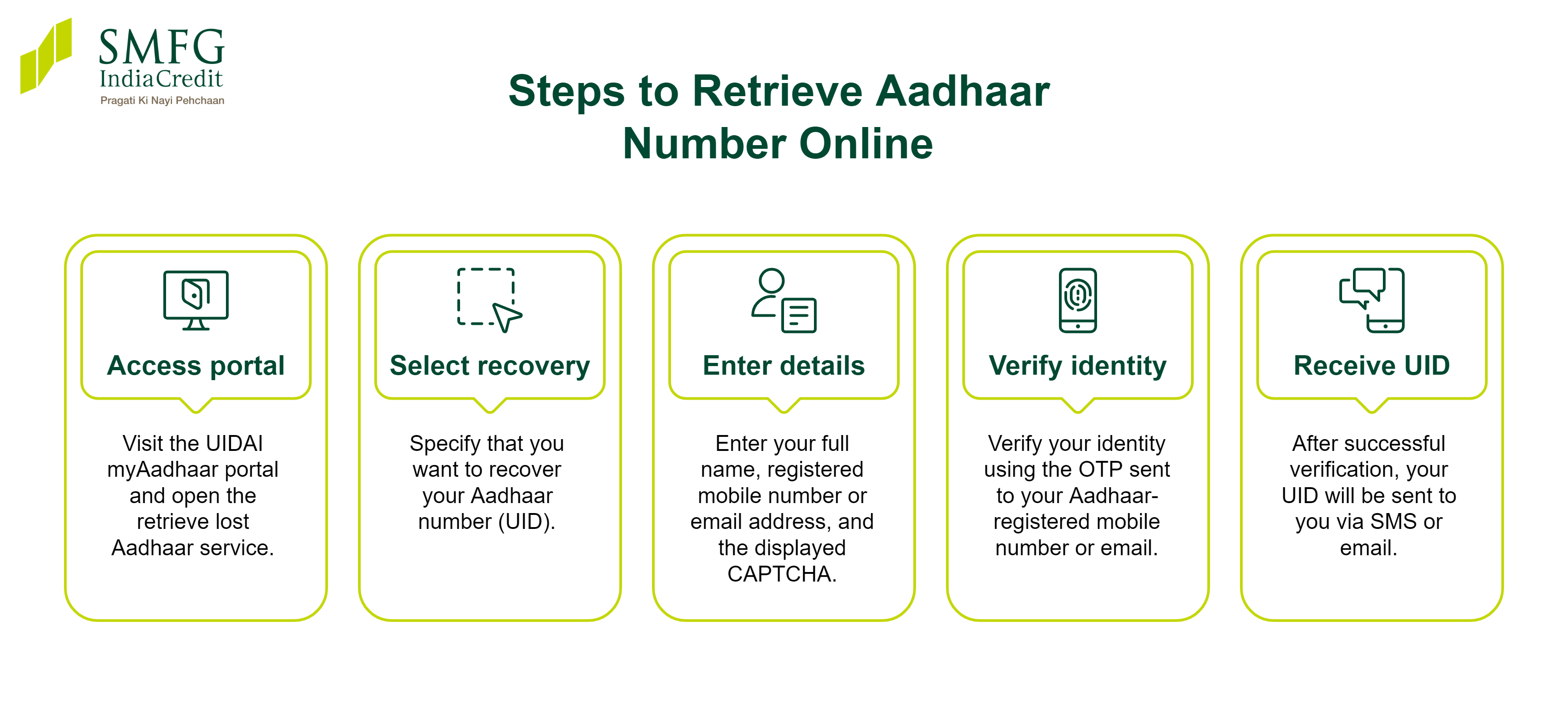
- Visit the UIDAI myAadhaar portal and open the UIDAI retrieve lost Aadhaar service.
- Specify that you want to recover your Aadhaar number (UID).
- Enter your full name, registered mobile number or email address, and the displayed CAPTCHA.
- Verify your identity using the OTP sent to your Aadhaar-registered mobile number or email.
- After successful verification, your UID will be sent to you via SMS or email, depending on the option selected.
Keep your registered contact details updated to ensure you can access this service whenever required.
Step-by-Step Process to Retrieve Aadhaar UID Online
- Visit the official UIDAI portal and open the UIDAI Aadhaar retrieval
- Select the option to retrieve lost UID or Aadhaar Number.
- Enter your full name as recorded in Aadhaar.
- Provide your registered mobile number or email address.
- Enter the displayed CAPTCHA and proceed.
- Request an OTP for identity verification.
- Enter the OTP received on your registered mobile number or email.
- After successful verification, your Aadhaar UID online request will be processed.
- Your Aadhaar number will be sent to you via SMS or email, depending on the contact details verified.
How to Retrieve Lost Enrolment ID (EID) Online
If your Aadhaar enrolment ID is lost, you can recover it using the same UIDAI online retrieval service used for Aadhaar numbers. The EID is useful for tracking your Aadhaar status, downloading your Aadhaar after successful enrolment or an update, and accessing other Aadhaar-related services. To retrieve lost EID online, follow these steps:
- Visit the official UIDAI myAadhaar portal and open the UID/EID retrieval service.
- Select the option to recover the Enrolment ID (EID).
- Enter your full name, registered mobile number or email address, and the displayed CAPTCHA.
- Verify your identity using the OTP sent to your registered mobile number or email.
- Once the verification is successful, find the Aadhaar EID details through the message sent to your registered contact.
- Use the recovered EID for Aadhaar download, checking your Aadhaar status, or other eligible UIDAI services.
How to Retrieve Lost or Forgotten Aadhaar Number Using mAadhaar App
You can also retrieve Aadhaar using mAadhaar if your registered mobile number or email ID is linked to your Aadhaar records. The app provides a convenient way to recover your UID or EID without visiting an enrolment centre. To retrieve your mAadhaar lost UID/EID, follow these steps:
- Open the mAadhaar app on your mobile device.
- Select the option for Aadhaar UID/EID retrieval.
- Enter your full name along with your registered mobile number or email ID.
- Complete the Aadhaar OTP verification using the OTP sent to your registered contact details.
- Once the verification is successful, your UID or EID will be shared through the registered communication channel.
- You can then use the recovered Aadhaar number via mAadhaar to access eligible Aadhaar-related services.
This method is available only if your registered mobile number or email ID is already linked with your Aadhaar.
How to Retrieve Lost or Forgotten Aadhaar UID/EID Offline
If you do not have access to your registered mobile number or email address, you can retrieve Aadhaar offline by visiting an Aadhaar Seva Kendra or Permanent Enrolment Centre.
Here is how to retrieve an Aadhaar number without a mobile number:
- Visit the nearest Aadhaar Seva Kendra for the lost Aadhaar retrieval process or Permanent Enrolment Centre.
- Inform the operator that you wish to recover your Aadhaar number or Enrolment ID.
- Provide the required demographic details for verification.
- Complete the biometric verification, if required.
- Once your identity is verified, you can obtain your Aadhaar details or request to print Aadhaar, as applicable.
Offline Aadhaar Retrieval Process at Aadhaar Seva Kendra
- Locate the nearest Aadhaar Seva Kendra with a lost Aadhaar retrieval facility or an Aadhaar enrolment centre lost UID assistance centre.
- Carry any available identity details or supporting documents, if available.
- Provide your demographic data to the Aadhaar centre operator for verification.
- Complete Aadhaar biometric verification through biometric authentication, which may include a fingerprint or iris scan.
- Upon successful biometric verification, request your Aadhaar number or a printed copy of your Aadhaar, as applicable.
How to Retrieve an Aadhaar Number Without a Registered Mobile Number
Recovering your Aadhaar details online is generally not possible if you need to retrieve Aadhaar without a mobile number, as the process relies on an OTP sent to the registered mobile number or email address. If you have a lost Aadhaar and a mobile number not registered situation, the following options are available:
- Visit the nearest Aadhaar Seva Kendra or enrolment centre.
- Complete biometric verification to establish your identity.
- Request assistance to recover your Aadhaar number without OTP through the offline process.
- Apply for a mobile update to link your current mobile number with Aadhaar for easier access to online services in the future.
Can You Retrieve Aadhaar Card Number Using Name and Date of Birth?
Yes, you can retrieve Aadhaar by name through the official UIDAI retrieval service, but additional details are required. Simply providing your full name or trying to obtain your Aadhaar number using your date of birth alone is generally not sufficient. To find your Aadhaar number by name, you must also have access to your registered mobile number or registered email address to complete OTP verification.
If you no longer have access to your registered contact details, online retrieval will not be possible. In such cases, visit the nearest Aadhaar Seva Kendra or Permanent Enrolment Centre, where your identity can be verified through the prescribed offline process before your Aadhaar details are retrieved.
How to Download e-Aadhaar After Retrieving UID/EID
Once you have successfully recovered your Aadhaar number or Enrolment ID, you can download e-Aadhaar through the official UIDAI myAadhaar portal. The process is straightforward and allows you to download an Aadhaar card online as a password-protected Aadhaar PDF. To access your e-Aadhaar after UID retrieval, follow these steps:
- Visit the UIDAI myAadhaar portal and select the Download Aadhaar service.
- Choose to download using your Aadhaar number or EID.
- Enter the required details and the displayed CAPTCHA.
- Verify your identity using the OTP sent to your registered mobile number.
- Download and save the Aadhaar PDF for future use.
Aadhaar PDF Password After Download
After you download e-Aadhaar, the file is protected with an Aadhaar PDF password to safeguard your personal information. The e-Aadhaar password is generally the first four letters of your name in capital letters, followed by your year of birth.
Example: If the name is Rahul Sharma and the year of birth is 1995, the Aadhaar card PDF password will be RAHU1995.
Use this password to open the downloaded Aadhaar PDF securely.
How to Order an Aadhaar PVC Card After Retrieving an Aadhaar Number
Once you complete the Aadhaar retrieve process, you can order an Aadhaar PVC card through the official UIDAI website if your physical Aadhaar card is lost or you would like a more durable replacement.
The Aadhaar PVC card online service allows eligible users to request a printed card by following these steps:
- Visit the UIDAI website and select the Aadhaar PVC card service.
- Enter your Aadhaar number and complete the required verification.
- Confirm your address and other details before submitting the request.
- Complete the online payment, if applicable.
- Submit the application and keep the acknowledgement for future reference.
- UIDAI generally hands over the printed PVC card to the Department of Posts within 5 working days (excluding the request date). It is subsequently delivered through Speed Post in accordance with the applicable postal delivery process.
Online vs Offline Aadhaar Retrieval: Quick Comparison
The available lost Aadhaar recovery methods depend mainly on whether you have access to your registered contact details. The table below compares online and offline Aadhaar retrieval options.
When comparing how to retrieve Aadhaar online vs offline, choose the method that best matches your situation.
|
Method
|
Best Used When
|
Verification Required
|
|
UIDAI website
|
You have access to your registered mobile number or email
|
OTP
|
|
mAadhaar
|
Your Aadhaar is linked to the app, and registered contact details are available
|
OTP
|
|
Aadhaar Seva Kendra
|
You do not have access to your registered mobile number or need offline assistance
|
Biometric verification
|
Online methods are generally quicker, while an Aadhaar Seva Kendra is the appropriate option if online verification is not possible.
Quick Comparison: Online, mAadhaar, and Offline Method
|
Aadhaar Retrieval Method
|
Best For
|
Requirement
|
Result
|
|
UIDAI website
|
Users with access to registered contact details
|
OTP verification
|
UID/EID received through SMS or email
|
|
mAadhaar app
|
Users who prefer mobile-based access
|
OTP verification with linked mobile or email
|
Quick Aadhaar retrieval through the app
|
|
Aadhaar Seva Kendra
|
Users without access to their registered mobile number
|
Biometric verification
|
Aadhaar retrieval or print assistance
|
The availability of these Aadhaar recovery options depends on your access to registered contact details. Choose the UIDAI website, mAadhaar app, or Aadhaar Seva Kendra based on the verification method available to you.
Common Issues While Retrieving Lost Aadhaar UID/EID
While recovering your details, you may occasionally encounter an Aadhaar retrieval problem.
If you are unable to retrieve Aadhaar number details, the issue is often related to verification or incorrect information. The following checks may help:
- Aadhaar OTP Not Received: Ensure your registered mobile number has network coverage and request a fresh OTP.
- Aadhaar Mobile Number Not Linked: Visit an Aadhaar Seva Kendra for offline assistance.
- Name Mismatch: Verify that your name matches the Aadhaar records exactly.
- CAPTCHA Error: Refresh the page and enter the newly displayed CAPTCHA correctly.
- Incorrect Personal or Contact Details: Recheck all information before submitting the request.
- UIDAI Portal Unavailable: Wait for some time and try again later.
If the issue persists, contact UIDAI or visit your nearest Aadhaar Seva Kendra for further assistance.
Safety Tips After Losing Aadhaar Card
Losing your Aadhaar card does not necessarily mean your identity has been compromised, but taking prompt precautions can help reduce the risk of lost Aadhaar misuse. Following these Aadhaar safety tips can help protect Aadhaar number details and minimise the chances of unauthorised use.
- Avoid Sharing Aadhaar Publicly: Do not post or share your Aadhaar details unnecessarily.
- Use Masked Aadhaar: Download and use a masked Aadhaar wherever it is accepted to limit the exposure of your Aadhaar number.
- Download Only from Official Sources: Always obtain Aadhaar-related documents through the UIDAI official portal.
- Avoid Unauthorised Agents: Use only authorised UIDAI services for Aadhaar-related requests.
- Lock Your Biometrics if Required: Enable the Aadhaar biometric lock feature through UIDAI if you are concerned about potential misuse.
If you suspect any unauthorised activity involving your Aadhaar, contact UIDAI promptly and take the appropriate security measures.
Masked Aadhaar vs Regular Aadhaar
The masked Aadhaar meaning refers to a version of the Aadhaar card that conceals the first eight digits of the Aadhaar number and displays only the last 4 digits. A regular Aadhaar displays the complete 12-digit number.
Where accepted, many users prefer to download a masked Aadhaar to reduce unnecessary exposure of their Aadhaar number while still using it as identity proof. Both versions are issued by UIDAI and remain digitally verifiable.
|
Feature
|
Masked Aadhaar
|
Regular Aadhaar
|
|
Aadhaar Number Display
|
First 8 digits masked; only the last 4 digits visible
|
Full 12-digit Aadhaar number displayed
|
|
Privacy
|
Better protection against unnecessary disclosure
|
Full number visible wherever shared
|
|
Best Used For
|
Routine identity verification where a masked version is accepted
|
Situations requiring the complete Aadhaar number
|
|
Issued By
|
UIDAI
|
UIDAI
|
Should You File a Police Complaint for a Lost Aadhaar Card?
A lost Aadhaar police complaint is generally not required simply because your Aadhaar card has been misplaced, as the Aadhaar number itself cannot be blocked like a debit or credit card. However, if you suspect unauthorised use or identity fraud, filing an Aadhaar card lost complaint or an Aadhaar misuse complaint may be a prudent precaution.
You should also consider enabling the biometric lock feature through UIDAI and reviewing your Aadhaar authentication history, where available, to check for any suspicious activity.
Conclusion
If you are wondering how to retrieve an Aadhaar number online, the official UIDAI website and mAadhaar app are the quickest options when your registered mobile number or email is linked to Aadhaar. If you are unable to complete Aadhaar retrieval online through these channels, visit the nearest Aadhaar Seva Kendra for offline assistance. Once you recover your lost Aadhaar UID/EID details, remember to download your e-Aadhaar or order an Aadhaar PVC card, if required, and follow recommended security practices to protect your Aadhaar information.
Keeping your Aadhaar details readily accessible can also help streamline identity verification when applying for financial products such as a personal loan.
If you are looking for financing, SMFG India Credit offers personal loans of up to Rs. 10 Lakhs* at interest rates starting from 12.5%* per annum.
Before applying, use our personal loan eligibility calculator to find out how much you may qualify for.
The personal loan EMI calculator can also be used prior to the application to estimate your monthly repayments and plan your budget accordingly.
* Please note that this article is for your knowledge only. Loans are disbursed at the sole discretion of SMFG India Credit. Final approval, loan terms, disbursal process, foreclosure charges and foreclosure process will be subject to SMFG India Credit's policy at the time of loan application. If you wish to know more about our products and services, please contact us