Checking your Aadhaar application progress online is simple if you have your EID, URN, or SRN details available. If you are wondering how to check the status of the Aadhaar card, you can track updates through the UIDAI portal, SMS services, or helpline support. Most users can check Aadhaar status within a few days of submitting an enrolment or update request.
What Is Aadhaar Card Status?
Aadhaar card status refers to the progress of your Aadhaar enrolment, update, or correction request after submission. It helps applicants understand whether their request is under review, approved, or completed. That is why many people wish to know how to check their Aadhaar status online to track address changes, mobile number updates, or new Aadhaar applications.
In FY 2026, the Unique Identification Authority of India continues to offer digital tracking facilities through official UIDAI platforms, making it easier to monitor Aadhaar-related requests without visiting an enrolment centre repeatedly.
What Details Are Required to Check Aadhaar Status?
To check UIDAI Aadhaar status online, users usually need details such as the Enrolment ID (EID), Update Request Number (URN), or Service Request Number (SRN), depending on the type of request submitted. A registered mobile number may also be required to receive OTPs and status updates. These reference numbers help UIDAI identify and track specific enrolment, correction, or update requests during processing.
|
Detail
|
Purpose
|
|
Enrolment ID (EID)
|
Used to track new Aadhaar enrolment applications.
|
|
Update Request Number (URN)
|
Used for tracking Aadhaar update or correction requests.
|
|
Service Request Number (SRN)
|
Used for certain online Aadhaar-related service requests.
|
|
Registered Mobile Number
|
Required for OTP verification and status alerts.
|
How to Check Aadhaar Card Status Online?
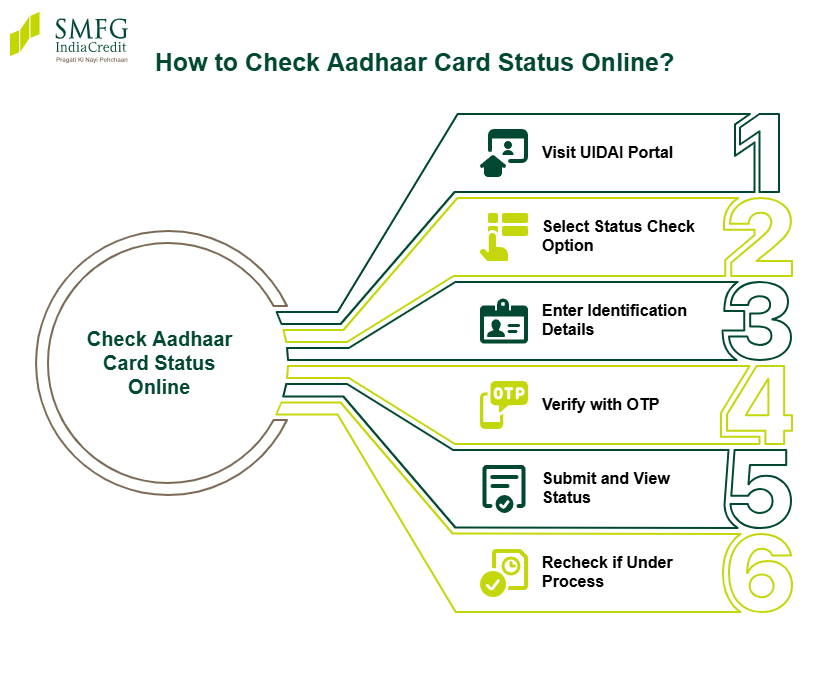
To check Aadhaar card status online, visit the UIDAI portal and choose the option to check enrolment or update status. This is useful for users wondering how to check new Aadhaar card status online after enrolment, or those tracking a correction request through Aadhaar card tracking online. You may also use the mAadhaar app for some Aadhaar-related services.
- Visit the UIDAI portal.
- Select the option to check Aadhaar enrolment or update status.
- Enter your EID, URN, or SRN, as applicable.
- Verify the request using the OTP sent to your registered mobile number, if required.
- Submit the details to view the current status.
- If the request is still under process, check again after a few days.
How to Check Aadhaar Card Update Status Online?
Users can track Aadhaar update requests submitted for name, address, mobile number, or date of birth changes through the UIDAI portal. If you are wondering how to check the updated status of Aadhaar card details, you can use your Update Request Number (URN) or Service Request Number (SRN) to view the latest progress online.
- Visit the UIDAI myAadhaar portal.
- Open the Aadhaar update status tracking page.
- Enter your URN or SRN correctly.
- Complete OTP verification if required.
- Submit the details to check whether the update request is under process, approved, or completed.
How to Check Aadhaar PVC Card Status?
Users who have ordered an Aadhaar PVC card can track the delivery status online through the UIDAI portal. The status page shows whether the PVC card request is under process, printed, dispatched, or delivered. In most cases, the Aadhaar PVC card is delivered within a few working days after successful processing.
- Visit the UIDAI Aadhaar PVC card status page.
- Enter your SRN, Aadhaar number, or Virtual ID (VID).
- Complete OTP verification using the registered mobile number.
- Submit the details to view the latest order and delivery status.
How to Check Aadhaar Status Without Enrolment Number?
If you have misplaced your enrolment slip, you can still recover your details through UIDAI services. Users searching for how to check Aadhaar enrolment status online may retrieve their EID using their registered mobile number and basic personal details. This also helps applicants who want to check Aadhaar status without EID after losing their acknowledgement receipt.
- Visit the UIDAI portal and select the EID retrieval option.
- Enter your registered mobile number and name details.
- Complete OTP verification.
- Retrieve the EID sent to your mobile number.
- Use the recovered EID to track Aadhaar status online.
Common Aadhaar Status Messages and Their Meaning
When checking Aadhaar application or update progress online, users may come across different status messages. These messages indicate the current stage of processing and help applicants understand whether further action is required. Reviewing the status carefully can help avoid delays in receiving the Aadhaar card or updated details. Here are common status messages you may see:
|
Aadhaar Status Message
|
Meaning
|
|
Under Process
|
The enrolment or update request is still being reviewed by UIDAI.
|
|
Generated
|
The Aadhaar number or updated details have been successfully created.
|
|
Pending Verification
|
Submitted details or documents are being verified.
|
|
Rejected
|
The request was not approved due to incorrect details or document issues.
|
|
Dispatched
|
The Aadhaar letter or PVC card has been sent for delivery.
|
Keeping track of Aadhaar status is important because Aadhaar is widely used across financial services such as investments, insurance, and personal loan applications. Even small errors in personal details can lead to verification delays if they are not corrected on time.
How Long Does Aadhaar Verification or Update Take?
Aadhaar enrolment, verification, and update requests usually take a few days to several weeks, depending on the type of request and verification requirements. Simple updates, such as mobile number or address changes, may be processed faster, while biometric or document-related corrections can take longer. Delays may occur due to incomplete documents, verification mismatches, high application volumes, or technical issues. Users can regularly track their request status online through the UIDAI portal for the latest updates.
Tip: If you are planning to apply for financing after an Aadhaar update, it may help to keep other personal loan documents required or paperwork for other credit products ready in advance. Depending on your employment and financial profile, this may include PAN, bank statements, salary slips, ITR records, or business registration documents.
Common Issues While Checking Aadhaar Status and Solutions
Users may sometimes face issues while checking Aadhaar application or update status online. Common problems include entering an incorrect EID or URN, OTP delivery failures, delayed processing, or temporary portal errors. In most cases, these issues can be resolved with simple troubleshooting steps.
- Recheck the EID, URN, or SRN entered on the portal.
- Ensure the registered mobile number is active for OTP verification.
- Wait for some time and retry if the UIDAI website is temporarily unavailable.
- Clear browser cache or use a different browser if pages are not loading properly.
- Contact UIDAI support if the status remains unchanged for an unusually long period.
Latest Aadhaar Status Check Updates for 2026
In 2026, UIDAI has continued to enhance Aadhaar services through improvements to the myAadhaar portal and digital verification systems. Recent updates include a new Aadhaar mobile app with enhanced security features, simplified digital identity verification, and improved status-tracking services. UIDAI has also updated the list of Aadhaar documents to streamline enrolment and update processes, making Aadhaar services more accessible and user-friendly for applicants.
Conclusion
Tracking Aadhaar status online can help users stay informed about enrolment, update, correction, and PVC card requests. Keeping details such as EID, URN, SRN, and registered mobile numbers ready can make the process smoother and help resolve common issues more quickly.
Since Aadhaar is often required for KYC verification, maintaining updated records may also support faster application processing for services such as a personal loan.
If you’re exploring financing options, SMFG India Credit offers unsecured funds of up to Rs. 30 lakhs* at competitive personal loan interest rates and flexible repayment tenures.
Check your potential monthly repayments using our personal loan EMI calculator and apply online today.