When you submit a request to update your Aadhaar details, the Unique Identification Authority of India (UIDAI) issues a Update Request Number to track your request. This 14-digit code lets you check URN status online or offline at any point, so you always know whether your update is approved, pending, or rejected.
What Is the URN in Aadhaar?
The URN in Aadhaar is a 14-digit tracking code issued by UIDAI every time you submit a request to update your Aadhaar details. URN meaning in Aadhaar card is straightforward: it is your reference ID for that specific update request. Whether you applied online through the myAadhaar portal or visited an Aadhaar Seva Kendra in person, you will receive a URN the moment your request is submitted. You use it to check the URN status until your update is resolved.
What Does URN Stand for in Aadhaar?
The URN full form is Update Request Number. It is one of the tracking identifiers used within the UIDAI system. Here is how it differs from the others:
|
Identifier
|
Full Form
|
When It is Issued
|
Used For
|
|
URN
|
Update Request Number
|
When you update existing Aadhaar details
|
Tracking Aadhaar correction status
|
|
EID
|
Enrolment ID
|
When you first enrol for a new Aadhaar
|
Tracking new Aadhaar generation
|
|
SRN
|
Service Request Number
|
When you order a PVC Aadhaar card or other services
|
Tracking service requests
|
When Is a URN Generated?
A URN is generated automatically by UIDAI whenever you submit an Aadhaar update request. It helps track the status of changes made to your Aadhaar details. If multiple updates are submitted together, they are usually covered by a single URN. Separate requests made on different dates receive different URN in the Aadhaar card.
It is generated for updates such as:
- Name correction or change
- Address update
- Date of birth correction
- Gender update
- Mobile number or email ID update
- Document update
- Biometric update (fingerprints, iris scan, or photograph)
Where Can You Find the URN in Aadhaar?
You can find the URN in the following places:
- Aadhaar acknowledgement slip
- SMS sent to your registered mobile number
- myAadhaar portal confirmation screen
- mAadhaar app update history
Keep your acknowledgement slip and the URN safe until your Aadhaar card URN status is resolved. Without it, tracking your updates becomes difficult.
How to Check URN Status in Aadhaar Online?
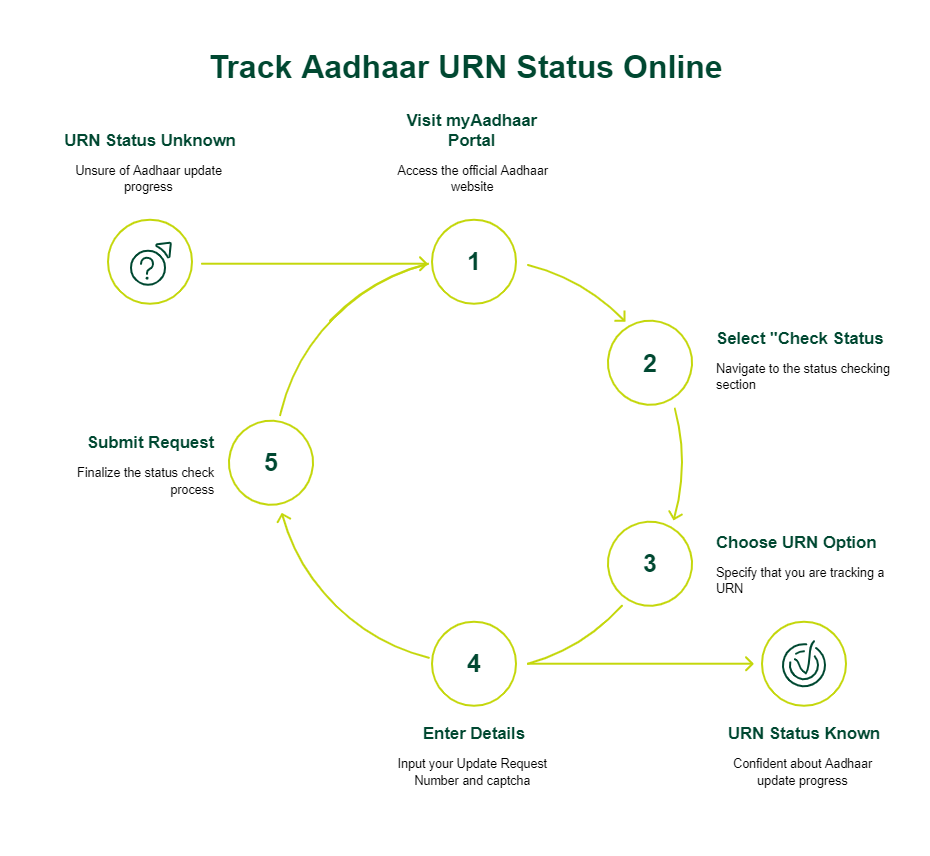
UIDAI URN tracking online is simple and usually takes only a few minutes. Visit the myAadhaar portal, select “Check Enrolment and Update Status,” choose the URN option, enter your Update Request Number and captcha code, then click “Submit.”
The status may show:
- Approved: Aadhaar updated successfully
- Under Process: Request still under review
- Rejected: Update not approved due to document or detail issues
You can also check your URN Aadhaar status by calling the toll-free UIDAI helpline at 1947 from your registered mobile number and following the IVR instructions.
How to Check Aadhaar Update Status Without URN?
If you do not have your URN, you still have a few options for Aadhaar update status check:
You can check the status using:
- UIDAI helpline at 1947
- Aadhaar Seva Kendra visit with a valid ID
- Log in to the mAadhaar app using your registered mobile number to view update-related information
Difference Between URN, EID, and SRN in Aadhaar
The SRN vs URN vs EID Aadhaar distinction is one that many people mix up. Here is a clear breakdown:
|
Feature
|
URN
|
EID
|
SRN
|
|
Purpose
|
Track Aadhaar detail updates
|
Track new Aadhaar registration
|
Track service requests like PVC card
|
|
Length
|
14 digits
|
28 digits
|
Begins with "S", varies in length
|
|
When issued
|
On submitting an update
|
On the first Aadhaar enrolment
|
On ordering Aadhaar services
|
|
Where to use
|
myAadhaar URN status check page
|
myAadhaar status check page
|
myAadhaar PVC card status page
|
|
Expires
|
Once the request is resolved
|
Once Aadhaar is generated
|
Once the service is fulfilled
|
The Aadhaar Update Request Number (URN) is exclusively for people who already have an Aadhaar and are making changes to it.
How Long Does Aadhaar Update Take After URN Generation?
According to UIDAI, 90% of the update requests are completed within 30 days. Demographic updates like name or address changes generally take fewer working days, while document and biometric updates may take longer due to verification requirements. Online requests submitted through the myAadhaar portal are often processed faster than offline requests. Once approved, you can download the updated e-Aadhaar immediately, while the physical copy is usually delivered within a few weeks.
Tip: If you are planning to apply for credit products, such as a personal loan, it is advisable to ensure that your Aadhaar details are updated well in advance. Delays caused by incorrect personal information, outdated address details, or pending update requests can slow down identity verification during the loan application process.
The Aadhaar card is commonly used as both identity and address proof by lenders and forms an important part of the personal loan documents required during verification. Keeping your Aadhaar details accurate and updated can help make the application and approval process smoother.
Common Reasons Why URN Status Is Not Updating
If your URN status has not changed for several days, here are the likely reasons:
- Documents are still under verification
- Incorrect details or document mismatch
- Biometric verification is pending
- Heavy processing volume at UIDAI
- “Invalid URN” error due to delayed system registration
Before raising a complaint, make sure you have entered the URN correctly, along with the captcha code. If the status still does not update after a few days, try checking again later, contact the UIDAI helpline at 1947, or visit an Aadhaar Seva Kendra for assistance.
Tip: If you are planning to apply for credit while waiting for your Aadhaar update, it may help to prepare in advance by reviewing the documents required and using tools such as a personal loan eligibility calculator to understand your borrowing capacity.
What to Do If You Lose Your URN?
If you have misplaced your URN, you may still be able to retrieve it using a few simple methods. Check your SMS inbox or email for UIDAI confirmation messages sent when you submit the update. You can also log in to the myAadhaar portal to view your update history if your mobile is linked.
If none of these work, you may need to visit an Aadhaar Seva Kendra and resubmit the update request to obtain a new URN. Note that UIDAI does not have a formal process to retrieve a lost URN directly online.
Latest Aadhaar Update Rules Related to URN
Here are some recent Aadhaar update rules and changes you should be aware of:
- UIDAI has extended the free online Aadhaar document update service until June 14, 2027. This facility is available exclusively through the myAadhaar portal for updating identity and address proof documents.
- Aadhaar card revision charges were revised from October 2025.
Always check UIDAI’s official website before submitting an Aadhaar update request to confirm the latest rules.
Conclusion
The Aadhaar URN is a simple yet important tool. It is your only direct way to check the URN status and know whether your update has gone through. Keep your acknowledgement slip safe after submitting any Aadhaar correction request, and use the myAadhaar portal or UIDAI helpline for UIDAI URN tracking.
If you are planning to apply for financing after successfully updating your Aadhaar details, keeping your documents updated can help streamline the verification process. SMFG India Credit offers unsecured funding of up to Rs. 10 Lakhs* at competitive personal loan interest rates.
Use our personal loan EMI calculator to estimate your monthly repayments and apply online with ease.
* Please note that this article is for your knowledge only. Loans are disbursed at the sole discretion of SMFG India Credit. Final approval, loan terms, disbursal process, foreclosure charges and foreclosure process will be subject to SMFG India Credit's policy at the time of loan application. If you wish to know more about our products and services, please contact us