The Aadhaar seeding process involves linking your 12-digit Aadhaar number with essential services such as bank accounts, mobile numbers, and government welfare schemes.
The Aadhaar seeding meaning is straightforward: it creates a verified digital identity bridge that allows government subsidies, pensions, and benefits to reach the right person through Direct Benefit Transfer (DBT). Aadhaar seeding with the bank account ensures that this linkage is completed correctly and helps avoid delays in accessing such services.
What Is Aadhaar Seeding?
Aadhaar seeding is the process of associating your Aadhaar number with a specific account or service for the purpose of KYC verification, identity authentication, and seamless service delivery. The Aadhaar seeding meaning extends across multiple applications, including EPFO linking, mobile number registration, and bank account Aadhaar seeding.
Once your Aadhaar is seeded, it acts as a verified identifier that institutions and government agencies use to confirm your identity and transfer benefits directly to your account through the National Payments Corporation of India (NPCI) mapper system.
Aadhaar Seeding and Accounts Authentication
The Aadhaar seeding process involves authenticating your identity through biometric or demographic details. For bank accounts, seeding ensures that subsidies, pensions, or other benefits are credited directly to the linked account. Authentication is done via the National Payments Corporation of India (NPCI), which maps your Aadhaar to your bank account.
Why Aadhaar Seeding Is Important
The importance of Aadhaar seeding becomes evident in how it impacts both access to government schemes and financial security:
- Direct Benefit Transfer (DBT): Subsidies for LPG, scholarships, pensions, and welfare schemes are credited directly to your Aadhaar-linked bank account, eliminating intermediaries.
- Fraud Prevention: Bank Aadhaar seeding ensures that benefits reach only the verified account holder, significantly reducing identity fraud and duplicate claims.
- Easier KYC: Aadhaar serves as a universally accepted KYC document, making the identity verification process faster for financial products and government registrations.
- EPFO and Financial Services: Linking Aadhaar with EPFO, insurance, and lending institutions simplifies claims, withdrawals, and loan processing.
- Government Compliance: Aadhaar seeding is mandatory for eligibility under several government schemes, making it an essential step for millions of beneficiaries.
How to Check the Bank Account Aadhaar Seeding Status?
To confirm whether your Aadhaar is linked to your bank account, you can use the following methods for an Aadhaar seeding status check:
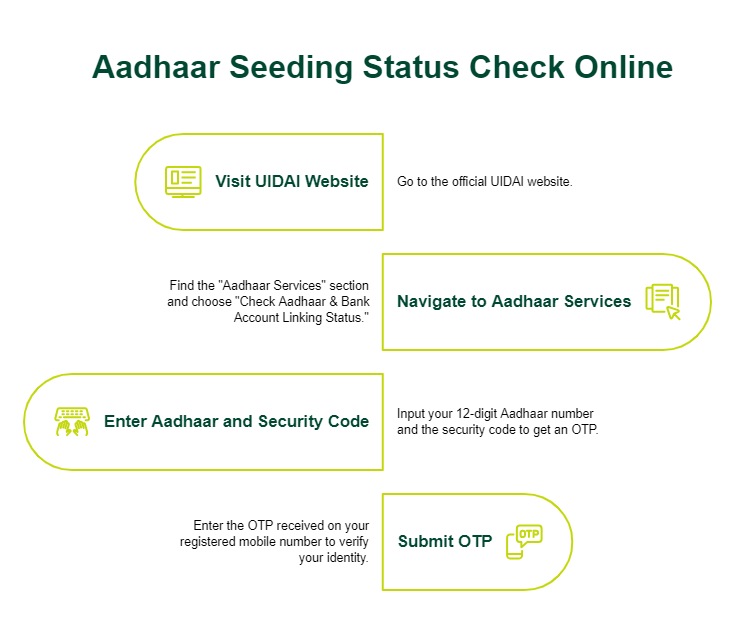
1. Online Method
- Visit the official UIDAI website.
- Navigate to the "Aadhaar Services" section and select "Check Aadhaar & Bank Account Linking Status."
- Enter your 12-digit Aadhaar number and the security code, and receive an OTP.
- Submit the OTP to check the Aadhaar seeding status. The portal will display whether your Aadhaar is linked to any bank account via NPCI.
2. mAadhaar App
- Download the mAadhaar app from the Google Play Store or the Apple App Store.
- Log in using your Aadhaar number and OTP.
- Go to the "Aadhaar Seeding Status" section.
- The app will show if your Aadhaar is seeded with your bank account or other services.
How to Link Your Bank Account with Aadhaar?
To link Aadhaar to a bank account, follow these steps:
1. Visit Your Bank Branch
- Go to your bank branch with your Aadhaar card and passbook.
- Request the NPCI Aadhaar seeding form.
- Fill in details like your Aadhaar number, account number, and personal information.
2. Submit the Form
- Attach a self-attested Aadhaar copy with the form.
- Submit the Aadhaar seeding form to the bank official.
- Ensure you provide accurate details to avoid delays.
3. Biometric Verification
- The bank may require biometric authentication (fingerprint or iris scan) to verify your identity.
- Once verified, the bank forwards the request to NPCI for mapping.
For an Aadhaar seeding online submission, many banks offer net banking or mobile app options:
- Log in to your bank’s net banking portal or mobile app.
- Navigate to the "Aadhaar Seeding" or "Update Aadhaar" section.
- Enter your Aadhaar number and submit.
- Complete OTP verification or biometric authentication as prompted.
Aadhaar Seeding Benefits
- Direct Benefit Transfers: Subsidies for LPG, scholarships, or pensions are credited directly to your bank account.
- Fraud Prevention: Aadhaar authentication reduces identity fraud and ensures benefits reach the intended recipient.
- Convenience: Linking Aadhaar with mobile numbers or EPFO simplifies access to services.
- Government Compliance: Aadhaar bank seeding is mandatory for availing certain government schemes, making it essential for eligibility.
Tips for Successful Aadhaar Seeding
For a successful and speedy Aadhaar seeding process:
- Provide Accurate Information: Ensure the Aadhaar number and personal details are correct in seeding form.
- Submit Correct Documents: Provide self-attested copies of Aadhaar and other required documents for Aadhaar seeding, like a passbook or ID proof.
- Complete Authentication: Be available for OTP or biometric verification.
- Monitor Status: Regularly check the Aadhaar seeding status to confirm successful linking.
Role of the Customer in Aadhaar Seeding
As a customer initiating Aadhaar seeding, your responsibilities are clearly defined. You must submit a consent form, either in paper or electronic format, depending on your bank’s process. If you are changing your Aadhaar linkage from one bank to another, you should mention your previous bank’s name in the form to help ensure that the National Payments Corporation of India (NPCI) mapper is updated correctly.
After Aadhaar seeding is completed, you may need to approach your gas agency or the relevant government department to claim any pending subsidy, depending on the scheme. If the subsidy is still not credited, you should contact the respective service provider for clarification.
Role of the Bank in Aadhaar Seeding
Banks play a central role in ensuring that Aadhaar seeding is completed accurately and efficiently. Here is what your bank is responsible for:
- Verify your consent form: The bank must validate your form and signature before initiating any update. .
- Link Aadhaar in CBS: The bank links your Aadhaar number in its Core Banking System (CBS) and prepares the data for further processing.
- Upload Mapper Files to NPCI: Linking Aadhaar in CBS alone is not sufficient. Financial institutions must ensure that the data is correctly uploaded to the NPCI so that the mapper reflects the updated Aadhaar seeding status with the bank.
- Resolve Processing Errors: If the NPCI mapper does not reflect the update after submission, the issue may lie in the bank’s upload or processing flow. The bank is responsible for investigating and resolving such discrepancies.
- Handle Customer Complaints: All Aadhaar seeding-related complaints must be addressed by the bank. NPCI typically routes customer queries to the respective bank for resolution.
If your Aadhaar seeding status is not updated even after submitting all required forms correctly, you should contact your bank’s customer care or service team to resolve the issue.
NPCI Role in Aadhaar Seeding
The National Payments Corporation of India (NPCI) maintains a mapper, which is the central tool used to map Aadhaar numbers to bank accounts for Direct Benefit Transfer. Here is how NPCI supports the Aadhaar seeding process
- NPCI provides the mapper tool that lenders use to add or remove Aadhaar numbers based on customer requests.
- It processes response files sent by banks and confirms successful updates.
- NPCI does not update records on its own. Only banks can initiate changes through the mapper.
- If a customer contacts NPCI directly regarding a seeding issue, NPCI typically forwards the query to the concerned bank for resolution.
For unresolved issues, customers may reach out to NPCI through its official grievance channels with their Aadhaar consent acknowledgement copy for further assistance.
Documents Required for Aadhaar Seeding
The Aadhaar seeding documents typically required when linking your Aadhaar with a bank account or other service include:
- Aadhaar Card: A self-attested copy of your Aadhaar card is the primary document required for Aadhaar seeding.
- Passbook or Bank Account Details: Required to confirm the account to which your Aadhaar will be linked.
- Completed Aadhaar Seeding Application Form: Available at your bank branch or through the net banking portal (if supported).
- Additional KYC Proof: Some institutions may request documents such as a passport, voter ID, or driving licence for further identity verification, especially if there are discrepancies
The exact documents required for Aadhaar seeding may vary slightly depending on your bank or the specific service with which you are linking your unique ID. It is advisable to confirm with your institution in advance to ensure a smooth process.
Common Issues in Aadhaar Seeding
Here are the most common Aadhaar linking problems and how you can resolve them:
- Mismatched Details: If the name or date of birth on your Aadhaar does not match your bank records, the seeding request will fail. Update the discrepancy with either UIDAI or your bank before reapplying.
- OTP Failure: Ensure your Aadhaar-linked mobile number is active and receiving network signals during OTP verification.
- Delay in NPCI Mapping: Even after the bank processes your request, the NPCI mapper may take a few days to reflect the update. Use the UIDAI website or the mAadhaar app to check Aadhaar seeding status regularly.
- Wrong Aadhaar Number Entered: A typographical error in the Aadhaar number on the seeding form can cause processing failure. Double-check the number before submission.
- Bank Upload Error: If the bank has not uploaded the updated data to the NPCI mapper correctly, contact your bank’s customer care for resolution.
Conclusion
Aadhaar seeding is a vital step in connecting your Aadhaar number to essential services, enabling seamless access to government subsidies, welfare schemes, and financial services. It is also important when applying for financial products such as personal loans, as Aadhaar serves as a key KYC document. Ensuring all Aadhaar-related formalities are completed can streamline identity verification and expedite loan processing.
Looking for financial support to achieve your goals? SMFG India Credit offers personal loan of up to Rs. 30 lakhs* at competitive interest rates. Apply online today or contact us for more information.
* Please note that this article is for your knowledge only. Loans are disbursed at the sole discretion of SMFG India Credit. Final approval, loan terms, disbursal process, foreclosure charges and foreclosure process will be subject to SMFG India Credit's policy at the time of loan application. If you wish to know more about our products and services, please contact us