An EPF balance check allows employees to view the total savings accumulated in their PF account, including monthly employer and employee contributions. Whether done through your UAN or alternative methods, regularly checking your EPF account balance helps verify deposits, track withdrawals, and ensure your records with the Employees' Provident Fund Organisation (EPFO) are accurate.
In 2026, digital tools have made the PF balance check (Provident Fund balance check) faster and more convenient. Reviewing your EPF passbook frequently also helps detect discrepancies early and strengthens long-term financial planning.
How to Check PF Balance
If you are wondering how to check your PF balance, you can use both online and offline methods.
Different Ways to Check PF Balance
- PF balance check through the EPFO Portal
- PF balance check through the UMANG app
- Missed call PF balance check service
- SMS PF balance check facility
- Through employer-managed records in case of exempted establishments
Online methods provide detailed access to your EPF Passbook. Offline methods allow balance to be checked on mobile without logging into a portal.
Let’s explore both online vs offline PF balance check methods in the following sections.
EPF Balance Check Without Using UAN (Offline)
You can check your EPF balance without a UAN or login access through mobile-based services. If you want to check your PF balance without logging in to the UAN portal, you can use the missed call service or SMS service. This EPF balance check without the UAN login page works only if your mobile number is registered and your Aadhaar, PAN, and bank account KYC details are updated.
PF Balance Check via Missed Call
The missed call service provides a quick PF balance check and number enquiry option. To check your PF balance by mobile missed call, follow these steps carefully:
- Dial the PF balance check number 9966044425 from your registered mobile number.
- The call disconnects automatically after two rings.
- You receive an SMS containing your provident fund balance and the latest EPF contribution details.
Although this is a PF balance check without the UAN number login process, your UAN must be activated. Your Aadhaar, PAN, and bank account KYC must be linked correctly. If your details are not verified with the EPFO Unified Portal, the EPF balance check may not work.
PF Balance Check Through SMS
The SMS service lets you check your PF balance without accessing the login page. This service works if your mobile number is linked to your UAN.
Send the message in the following format to use the PF balance SMS service:
EPFOHO UAN to 7738299899
The default language is English. For other languages (Hindi, Punjabi, Gujarati, Marathi, Kannada, Telugu, Tamil, Malayalam, and Bengali), add the first three characters of your preferred language after the UAN.
|
SMS format
|
Example
|
|
EPFOHO UAN
|
EPFOHO 123456789012
|
|
EPFOHO UAN <LAN>
|
EPFOHO 123456789012 TEL
|
EPF Balance Check Using UAN (Online)
An online EPF balance check provides a complete transaction history. When you perform a PF balance check with your UAN number, you can review your EPF passbook and see employer-wise EPF contribution records. Logging in with your UAN provides more detailed information compared to offline options.
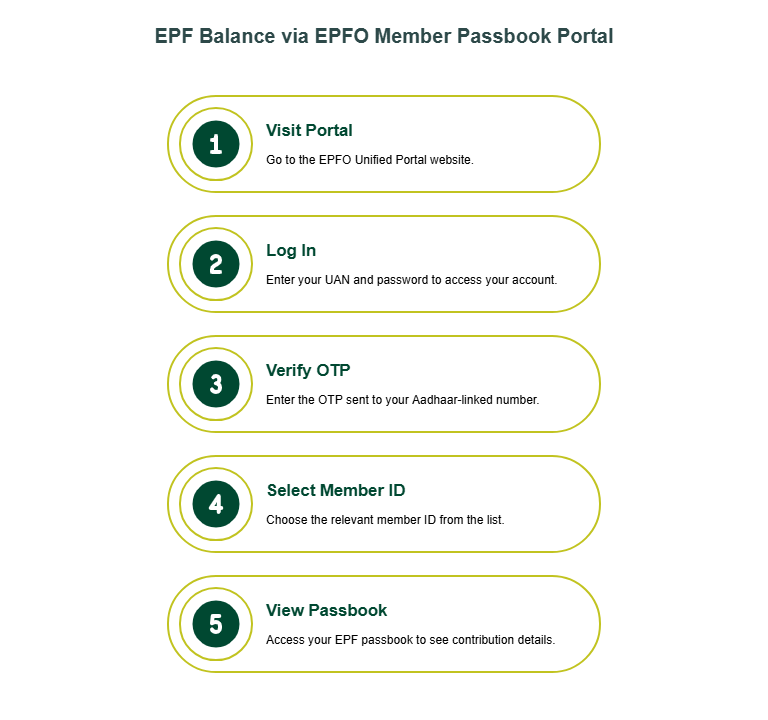
Check EPF Balance via EPFO Member Passbook Portal
For a detailed EPFO Unified Portal balance check, follow these steps:
- Visit the EPFO Unified Portal.
- Log in using your UAN and password.
- Enter the captcha and verify using the OTP sent to your Aadhaar-linked number.
- Select the relevant member ID.
- View your EPF passbook.
Your passbook clearly displays the employee share, employer share, and pension portion. This EPFO portal balance check allows you to track monthly EPF contribution deposits.
If the site experiences heavy traffic, especially during peak filing periods, wait and retry later. Make sure your UAN activation is complete before attempting to log in.
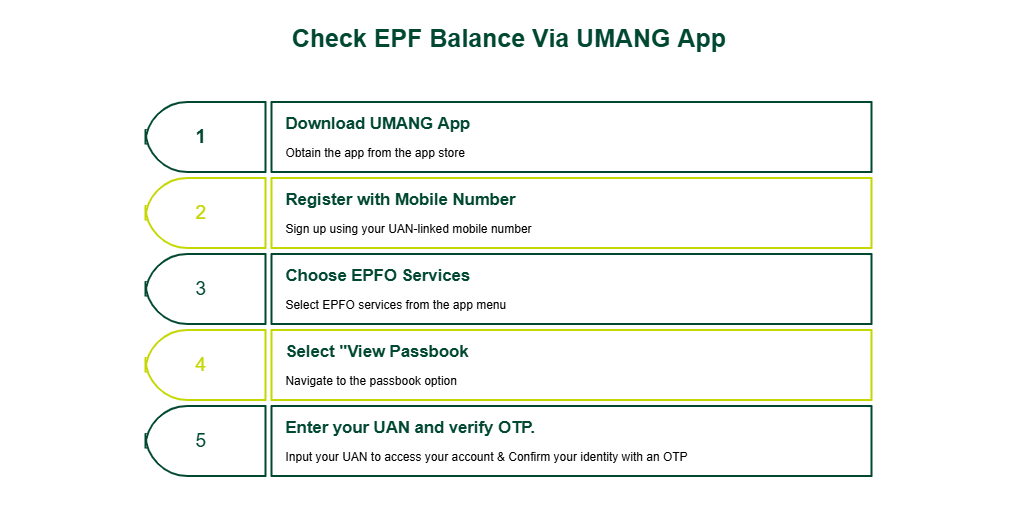
Check EPF Balance Via UMANG App
The UMANG app's EPF check option lets you view details instantly.
Steps for an online EPF balance check through the UMANG App are:
- Download the UMANG App.
- Register using your UAN-linked mobile number.
- Choose EPFO services.
- Select “View Passbook”.
- Enter your UAN and verify OTP.
The UMANG app provides easy access to the PF balance without requiring a desktop. It is particularly helpful if you want quick updates while travelling or away from your computer.
How to Check EPF Balance for Exempted Establishments?
If you work for organisations classified as exempt establishments, your provident fund is managed by a PF trust rather than directly by the EPFO. In such cases, your EPF balance will not appear on the EPFO Member Portal.
If your passbook shows as unavailable, contact your HR department or PF Trust office. They maintain separate records of your EPF contributions. This situation applies mainly to large companies that manage their own trust.
Things to Remember Before Checking PF Balance
As you learn how to check your PF balance, ensure the following requirements are met:
- UAN activation is completed.
- The Aadhaar-EPF linking process is finished.
- PAN is verified.
- Your mobile number is registered with UAN.
- Bank account KYC is approved.
- EPF KYC records are accurate.
If your details do not match the EPFO Member Portal records, your PF balance check with UAN number may fail. Keeping your Aadhaar and PAN details updated ensures smooth login access and helps avoid verification issues during the EPF balance check process.
Is the E-nomination Process for the PF Account Mandatory?
According to recent guidelines issued by the Employees' Provident Fund Organisation (EPFO), e-nomination is mandatory for all EPF members, although no specific deadline has been announced.
When you complete e-nomination through your UAN login, you add nominee details that are formally linked to your provident fund balance. If your nominee’s information is registered, claim settlement becomes faster and more straightforward for your family. Without e-nomination, your dependents may face delays and additional verification requirements when accessing PF funds.
Why Can't I Check My Balance?
If your EPF balance check is not working, consider the following possibilities:
|
Issue
|
Reason
|
|
UAN inactive
|
Activation incomplete
|
|
Mobile not linked
|
Number not registered
|
|
KYC pending
|
Aadhaar or PAN not verified
|
|
Exempted Establishments
|
PF is managed by a trust, not EPFO
|
|
Server delay
|
Temporary technical issue
|
Complete any pending updates and retry the online EPF balance check later. Ensuring your KYC, mobile number, and UAN activation are accurate greatly reduces login or passbook access issues.
Conclusion
You can check your PF balance easily today using a range of online and mobile-based tools. The most reliable options for viewing your EPF balance online are the EPFO Member Portal and the UMANG app, both of which offer quick access to contribution details, withdrawal history, and updated passbook records. If you prefer PF balance mobile methods, the missed call and SMS services provide instant information without logging in.
Regular balance checks help keep your records accurate and support better financial planning.
If you find yourself needing funds for short-term expenses, consider a personal loan instead of withdrawing from your retirement savings.
SMFG India Credit offers personal loans of up to Rs. 10 lakhs* with competitive interest rates starting from 12%* per annum. You can use our personal loan EMI calculator and eligibility calculator to make confident borrowing decisions. Check your personal loan eligibility, review the required documents, and apply online.
* Please note that this article is for your knowledge only. Loans are disbursed at the sole discretion of SMFG India Credit. Final approval, loan terms, disbursal process, foreclosure charges and foreclosure process will be subject to SMFG India Credit's policy at the time of loan application. If you wish to know more about our products and services, please contact us