When purchasing an immovable property, the buyer may be required to deduct TDS on property purchase if the transaction meets the applicable conditions under the Income Tax Act.
In such cases, Form 26QB, also known as the property TDS form, is used to report the tax deducted and deposit it with the Income Tax Department on behalf of the seller. This article explains what Form 26QB is, when it applies, how to complete and file it, download the acknowledgement, and avoid common filing mistakes.
Key Takeaways on Form 26QB
Understanding the basic Form 26QB rules can help buyers comply with TDS requirements when purchasing property. Here are the key points to remember:
- Section 194-IA TDS rate generally applies where the property transaction meets the prescribed threshold.
- The property buyer is responsible for deducting, depositing, and reporting the TDS.
- Form 26QB must be filed within the prescribed due date after deducting the tax.
- A separate Form 26QB is required for each buyer-seller combination in a property transaction.
- After successful payment, Form 16B can be downloaded from the TRACES Portal and issued to the seller as the TDS certificate.
What Is Form 26QB?
The Form 26QB meaning refers to an online challan-cum-statement used for depositing and reporting TDS deducted on the purchase of certain immovable properties under Section 194-IA of the Income Tax Act.
Also referred to as challan 26QB, it enables the property buyer to make the required TDS payment directly to the Income Tax Department while furnishing details of the transaction and the property seller. Unlike many other TDS provisions, a separate Tax Deduction Account Number (TAN) is generally not required to file Form 26QB online. Once the form is submitted successfully and the tax is paid, the buyer can later download Form 16B from the TRACES portal and issue it to the seller as the TDS certificate.
Why Is Form 26QB Required?
Understanding why Form 26QB is required helps buyers comply with the TDS provisions applicable to eligible property transactions. It serves as the TDS return for property purchase, ensuring timely tax deposit and supporting property TDS compliance. Its key purposes include:
- Enables the buyer to deposit the deducted TDS into the government account.
- Helps the seller receive TDS credit in Form 26AS and AIS, subject to successful processing.
- Allows the buyer to download and issue Form 16B as the TDS certificate.
- Supports accurate tax compliance and creates an official record of the TDS transaction.
Maintaining proper tax and property documentation can also be helpful when exploring property-backed financing options, such as a Loan Against Property.
Along with tax-related records, it is also prudent to keep other Loan Against Property documents, such as the property title deed and income proofs, readily available, depending on the lender's eligibility criteria and documentation requirements.
When Is Form 26QB Applicable?
Knowing when to file Form 26QB is important when purchasing an immovable property. The Form 26QB applicability arises in case of transactions involving eligible properties, other than rural agricultural land, where the sale consideration or stamp duty value is Rs. 50 lakhs or more. Form 26QB is commonly required in the following situations:
- The purchase involves an eligible residential property or commercial property.
- The sale consideration or the stamp duty value of the property is Rs. 50 lakhs or more.
Then the buyer is required to deduct TDS on property above Rs. 50 lakhs before making the payment to the seller. The exact applicability should always be determined based on the prevailing tax provisions and the specific details of the property transaction.
Who Needs to File Form 26QB?
In a property transaction covered under Section 194-IA, the buyer TDS on property obligation lies with the purchaser, who acts as the deductor. The seller, or deductee, receives credit for the tax deducted once it is deposited and processed. To ensure this happens correctly, both parties should provide accurate PAN details while filing the form. Individual and HUF buyers are also required to comply with these provisions, and a TAN is generally not required for filing Form 26QB under Section 194-IA. Accordingly, the answer to who should file Form 26QB is the buyer, not the seller.
TDS Rate Under Section 194-IA
The Section 194-IA TDS rate is generally 1% TDS on the sale consideration or the stamp duty value of the property, whichever is higher, provided the transaction meets the prescribed threshold. This TDS rate on property purchase determines the amount that the buyer must deduct before making payment to the seller.
When applying the Form 26QB TDS rate, it is also important to verify the seller's PAN. If a valid PAN is not available or is incorrect, higher TDS provisions may apply in accordance with the Income Tax Act.
Form 26QB Due Date
The TDS on property due date for Form 26QB online filing is within 30 days from the end of the month in which the tax is deducted. The challan-cum-statement and the corresponding TDS payment must be completed through the Income Tax Portal within this period. For example, if the tax is deducted during the month of April, the 26QB payment due date will be 30 May.
Details Required Before Filling Form 26QB
Keeping the details required for Form 26QB ready beforehand can help you complete the filing process accurately and avoid unnecessary delays. While the exact Form 26QB information required depends on the transaction, you should generally keep the following Form 26QB documents and details readily available:
- Buyer PAN and personal details
- Seller PAN and contact details
- Property address
- Sale agreement details
- Date of the property transaction and payment date
- Amount paid or credited to the seller
- Applicable stamp duty value
- TDS amount to be deposited
- Mobile number and email address for communication
- Preferred mode of payment for depositing the TDS
Verifying these details before filing the 26QB form online can help minimise errors and ensure timely compliance.
How to Fill Form 26QB Online
For Form 26QB online filing, log in to the Income Tax portal and open e-Pay Tax.
To fill 26QB step-by-step:
- Select the option for TDS on property purchase under Form 26QB.
- Enter the buyer’s and seller’s PAN details.
- Provide the transaction and property details.
- Enter the payment information and applicable TDS amount.
- Review all entries carefully before submission.
- Choose a payment mode and deposit the tax.
- Save the generated acknowledgement number and payment receipt.
This is how to fill Form 26QB online through the portal’s challan-cum-statement facility.
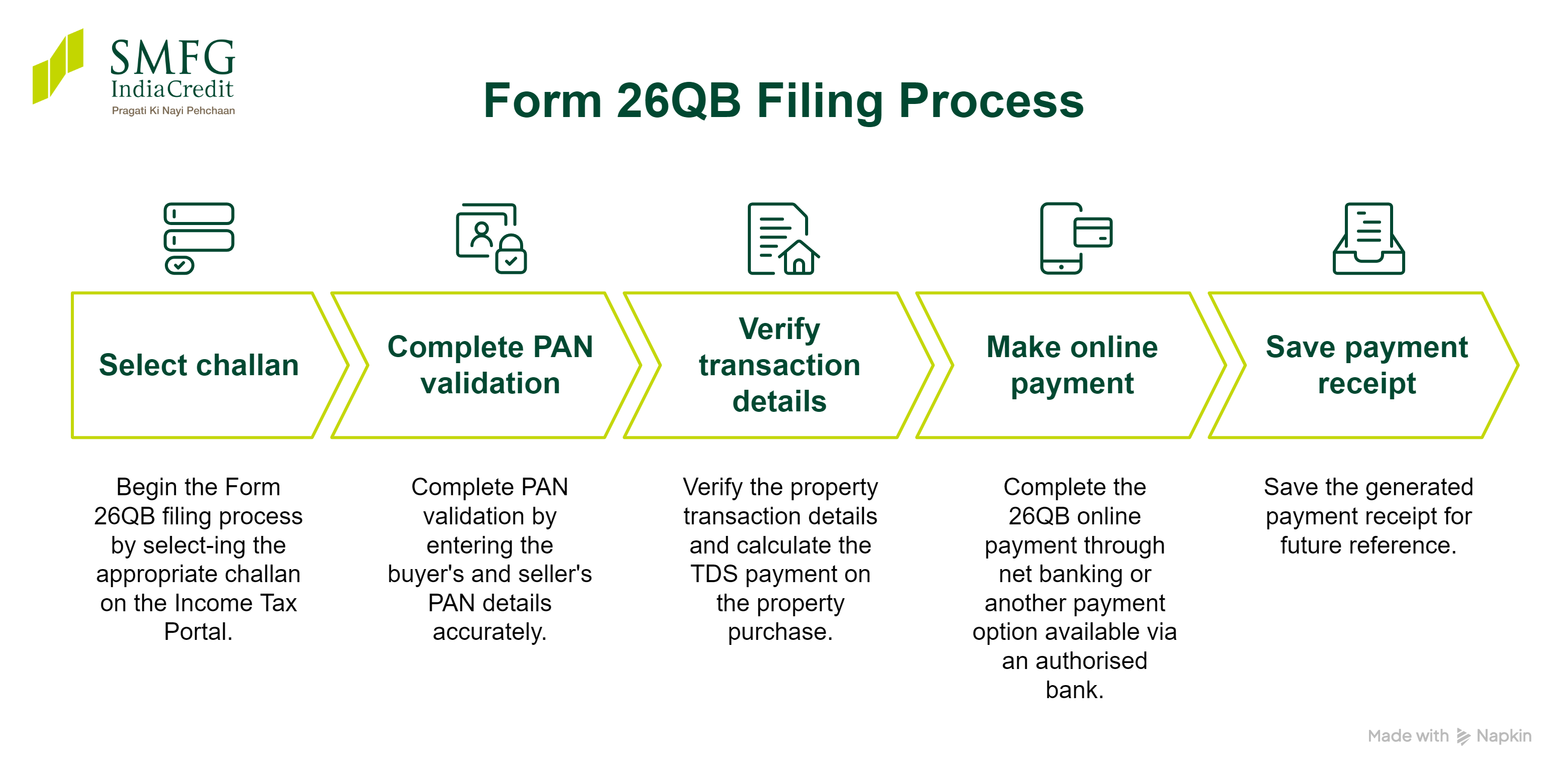
Step-by-Step Form 26QB Filing Process
- Begin the Form 26QB filing process by selecting the appropriate challan on the Income Tax Portal.
- Complete PAN validation by entering the buyer's and seller's PAN details accurately.
- Verify the property transaction details and calculate the TDS payment on the property purchase.
- Complete the 26QB online payment through net banking or another payment option available via an authorised bank.
- Save the generated payment receipt for future reference.
How to Pay TDS on Property Purchase Through Form 26QB
After completing the 26QB form online, the applicable tax must be deposited through the e-Pay Tax facility on the Income Tax portal. To pay TDS on property online, ensure that all transaction details are accurate before proceeding with the payment. The Form 26QB payment process generally involves the following steps:
- Open e-Pay Tax and review the completed Form 26QB details.
- Select the preferred 26QB online payment mode, such as net banking, debit card, or any other option available on the portal.
- Confirm the TDS payment on the property purchase and complete the transaction.
- Save the generated challan, payment receipt, and CIN (Challan Identification Number) for your records and future reference.
These records may be required for verification, and while downloading Form 16B later.
How to Download Form 16B After Filing Form 26QB
Once the Form 26QB payment is successfully processed and reflected in the system, the buyer can download Form 16B from the TRACES Portal. Form 16B after 26QB serves as the TDS certificate for property transactions and should be issued to the seller within 15 days from the due date of furnishing Form 26QB. The seller can use this certificate to claim TDS credit, which is also reflected in Form 26AS, subject to successful processing.
Steps to Download Form 16B
- Wait until the Form 26QB TDS payment is processed and reflected on the system.
- Log in to the TRACES portal using the required credentials.
- Navigate to the option for downloading Form 16B.
- Enter the relevant transaction details, including the acknowledgement number, where required.
- Submit the request and download Form 16B once it is available.
- Provide the downloaded certificate to the seller for their records and tax compliance.
Form 26QB PDF Download
You can download Form 26QB after successfully filing the challan-cum-statement through the Income Tax Portal by accessing the relevant property TDS section and entering the required transaction details.
The downloaded copy serves as a record of the information submitted and may be useful for future reference.
If you need to download Form 26QB in a blank PDF format for reference or offline review, it is available on the official Income Tax Department website. Always use the latest version published on the official portal before referring to or printing the form.
Section 194-IA Applicability for Form 26QB (Resident vs NRI Seller)
Form 26QB is generally used when purchasing immovable property from a resident seller, as the transaction is covered under Section 194-IA, subject to the prescribed conditions. If the property is purchased from a non-resident (NRI) seller, different TDS provisions under Section 195 of the Income Tax Act may apply, and Form 26QB cannot be used. Buyers should confirm the seller's residential status before deducting tax and filing the applicable TDS form to ensure compliance with the relevant tax provisions.
Where Can the TDS Deducted on the Property Be Seen By the Seller?
Once the buyer has successfully deposited the TDS and the transaction has been processed, the seller can generally view the tax credit in Form 26AS and the Annual Information Statement (AIS) on the Income Tax portal. The buyer should also download and issue Form 16B, which serves as the TDS certificate for the transaction. If the TDS does not appear within a reasonable time, both parties should verify the PAN details and the information furnished in Form 26QB to ensure there are no discrepancies.
How to Correct Form 26QB Mistakes
If you discover an error after filing, it is important to initiate the Form 26QB correction process as soon as possible. Common issues include a wrong PAN in Form 26QB, incorrect property details, an incorrect assessment year, payment mismatches, or a PAN mismatch. Depending on the type of error and the status of the transaction, corrections can generally be requested through TRACES.
- Identify the error in the filed Form 26QB.
- Log in to the TRACES portal and check whether the required correction is available.
- Submit the appropriate correction request with the revised details.
- Use the acknowledgement number to track the request, where applicable.
- Once processed, verify that the corrected information is reflected in the relevant records.
If the required correction is not available online, you may need to follow the procedure prescribed by the Income Tax Department. This is generally the process to correct 26QB online, subject to the nature of the correction requested.
Penalty and Interest for Late Filing Form 26QB
Failure to comply with the TDS provisions may result in a Form 26QB late filing penalty, depending on the nature of the default and the applicable provisions of the Income Tax Act. The following consequences may apply:
- Interest may be levied if TDS is deducted late or the TDS on property is not deposited within the prescribed time.
- A 26QB late fee under Section 234E may apply if the form is filed after the due date.
- Additional consequences under Section 201 may arise in certain cases of TDS default.
As the applicable late fee, interest, and penalty provisions may change, always refer to the latest tax rules or consult a qualified tax adviser for guidance.
Conclusion
Form 26QB is an important compliance requirement for every buyer purchasing eligible immovable property where Section 194-IA applies. Deducting and depositing TDS on property purchase on time, accurately completing the required details, and filing Form 26QB online within the prescribed timeline can help avoid unnecessary issues. After successful TDS payment, remember to download Form 16B from TRACES and provide it to the seller. Always verify the information carefully before submitting the form to ensure smooth compliance.
Proper tax compliance and accurate documentation can also help when exploring financing solutions against your purchased property. At SMFG India Credit, you can access Loans Against Property of up to Rs. 40 crore* at competitive LAP interest rates.
Our Loan Against Property EMI calculator can help you estimate your monthly obligations and make informed borrowing decisions.
Review the Loan Against Property eligibility criteria and start your application online.