Quick Summary
- To check Aadhaar validity, visit the UIDAI portal, open "Verify an Aadhaar Number" under Aadhaar services, enter your 12-digit Aadhaar number and CAPTCHA, and view the verification result.
- A valid Aadhaar displays details such as the age band, gender, state, and mobile number linkage status associated with the Aadhaar number.
- Aadhaar does not have an expiry date and remains valid for life.
- UIDAI has extended free online document updates on the myAadhaar portal until 14 June 2027, and the older mAadhaar app is being retired in favour of the new Aadhaar app.
- Since your Aadhaar number is widely used for banking, KYC, and government services, it is important to ensure that it remains active and authentic.
- A free online Aadhaar validity check helps verify whether your number is genuine and currently in use.
Aadhaar plays a vital role in identity authentication across banking, financial services, government schemes, and KYC processes. Verifying your Aadhaar details can help confirm that your identity records are active, accurate, and protected against misuse or fraud. If you are wondering how to check Aadhaar validity, the process is simple and can be completed through UIDAI's official portal. This Aadhaar verification guide explains the steps involved in conducting an Aadhaar card validity check online, helping you verify your Aadhaar status quickly and securely.
What Is Aadhaar Validity?
Aadhaar validity refers to whether your 12-digit Aadhaar number is genuine, issued by UIDAI, and currently active. A UIDAI Aadhaar verification check online does not reveal your complete personal details. Instead, it confirms that the Aadhaar number exists in UIDAI records and is valid. A successful Aadhaar verification process displays limited information such as your age band, gender, and state. This can help individuals and organisations confirm that the Aadhaar number is authentic before accepting it as identity or address proof.
Why Is Aadhaar Validity Check Important?
Checking your Aadhaar validity status can help avoid issues during various personal and financial transactions. A quick verification may be useful for:
- Identity verification for new bank accounts and official applications
- Banking transactions and Aadhaar KYC verification updates
- Loan applications where Aadhaar serves as identity and address proof, such as a personal loan
- SIM card activation and mobile number linkage
- Fraud prevention by helping identify fake or misused Aadhaar numbers
How to Check Aadhaar Card Validity Online
You can complete an Aadhaar validity check in minutes on the official UIDAI website. The service is public, so you do not need to log in or enter an OTP. You only need the 12-digit number you want to verify.
Here’s the step-by-step process covering how to check Aadhaar card validity online:
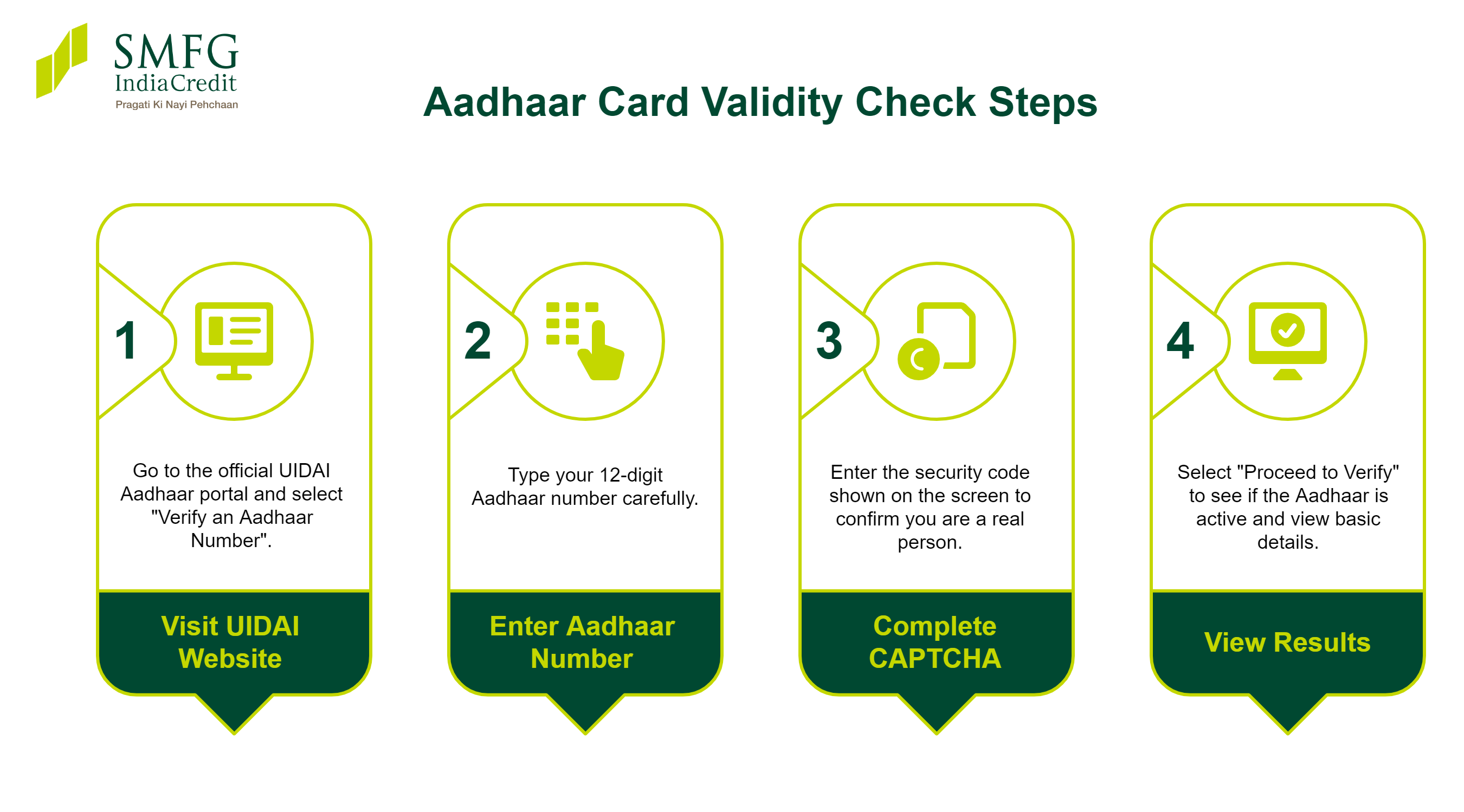
Step 1: Visit the UIDAI Official Website
Go to the official UIDAI Aadhaar portal. On the homepage, open the "Aadhaar Services" section and select "Verify an Aadhaar Number".
Step 2: Enter Your 12-Digit Aadhaar Number
Type your Aadhaar number carefully. A single wrong digit returns an invalid result, so check each number before moving ahead.
Step 3: Complete CAPTCHA Verification
Enter the security code, or CAPTCHA, shown on the screen. This step confirms a real person is making the request and blocks automated misuse of the UIDAI Aadhaar verification service.
Step 4: View Aadhaar Verification Online Results
Select "Proceed to Verify". If the number is active, the screen confirms that the Aadhaar exists and shows basic details. If it is not valid, you will see a message that the number does not exist or has been deactivated.
What Information Appears in Aadhaar Verification Results?
A successful UIDAI Aadhaar verification online shows limited, non-sensitive details. Your full name, photo, and address are never displayed. Here is what you can usually see:
|
Detail
|
What It Shows
|
|
Aadhaar validity status
|
Whether the Aadhaar is active
|
|
Age band
|
Your age range, not exact age
|
|
Gender
|
Male, female, or other
|
|
State
|
State linked to your Aadhaar
|
|
Mobile linkage
|
Last four digits of the linked number
|
What are the Documents Required to Verify an Aadhaar Card?
You do not need any documents to check Aadhaar validity. You only need the 12-digit number and the CAPTCHA shown on screen. A registered mobile number, OTP, or supporting proof is not required for basic verification.
Common Reasons Why Aadhaar May Show Invalid
Sometimes, an Aadhaar card verification may return an invalid result. This does not necessarily mean the Aadhaar number is fake. Common reasons include:
- Entering the 12-digit number incorrectly
- An Aadhaar that UIDAI has deactivated
- A child's Aadhaar not updated at age five or fifteen
- Outdated or mismatched records in the database
- A temporary server or browser issue during the check
If your details are correct but the verification still shows an invalid result, contact UIDAI by calling 1947 for assistance.
How to Check if an Aadhaar Card Is Deactivated or Not?
UIDAI sometimes deactivates Aadhaar numbers, such as those of deceased people, during database clean-ups. To check whether your Aadhaar is deactivated:
- Visit the UIDAI website and open the "Aadhaar Services" section.
- Select "Verify an Aadhaar Number".
- Enter your number and the CAPTCHA, then proceed with the Aadhaar status check.
- An active Aadhaar shows your basic details. A deactivated one shows an error saying the number is not valid.
What to Do if Your Aadhaar Shows Invalid
If your Aadhaar authentication is unsuccessful, follow these steps:
- Recheck the 12-digit number for typing errors and try again.
- Confirm whether UIDAI has deactivated Aadhaar.
- Update eligible demographic details through the myAadhaar portal, if required.
- Visit your nearest Aadhaar Seva Kendra for biometric or mobile number updates.
- If the issue persists, contact UIDAI by calling 1947 or emailing [email protected] for assistance.
What Is the Need for Aadhaar Card Verification?
The UIDAI Aadhaar verification process helps protect both individuals and organisations that rely on Aadhaar for identity verification. UIDAI provides this service to help confirm whether an Aadhaar number is valid and genuine, reducing the risk of identity misuse through fake or altered Aadhaar cards.
For individuals, it helps confirm that the Aadhaar number is active before submitting an important application. For lenders, employers, and service providers, it provides greater confidence that the Aadhaar is genuine.
Keeping your Aadhaar details accurate can help avoid KYC-related issues and streamline the documentation process when applying for financial products such as a personal loan.
A smooth KYC process, along with strong overall personal loan eligibility and creditworthiness, can help improve your chances of securing approval on favourable terms.
Aadhaar Validity Period
Your Aadhaar card has no expiry date and stays valid for life. However, there is one exception. A child who receives Aadhaar before age five must update biometrics at five and again at fifteen. If these Aadhaar update processes are missed, the child's Aadhaar can become invalid. For adults, the number stays valid even if details are not updated for years.
How to Verify Aadhaar Using the mAadhaar App
UIDAI is now retiring the older mAadhaar app and rolling out the new Aadhaar app. Using the app, you can:
- Sign in with your Aadhaar number and OTP
- View your Aadhaar profile and confirm it is active
- Scan a QR code on any Aadhaar to verify its details
- Share offline e-KYC securely without revealing the full number
The app is free on Android and iOS, and verification works similarly to the website.
Common Aadhaar Verification Process Errors and Solutions
Although the Aadhaar digital verification process is usually quick and straightforward, you may occasionally encounter errors that interrupt identity authentication. The table below outlines some common issues and practical solutions.
|
Error
|
Solution
|
|
Invalid Aadhaar shown
|
Recheck the 12-digit number
|
|
CAPTCHA failed
|
Refresh and enter the new code
|
|
Server not responding
|
Try again after some time
|
|
Page not loading
|
Clear the browser cache or switch browsers
|
How to Check if Your Mobile Number Is Linked to Aadhaar
Knowing whether your mobile number is linked to Aadhaar matters because OTP verification-based services and online updates depend on it. The verification result on the UIDAI Aadhaar portal shows the last four digits of your linked mobile number. You can also use UIDAI's "Verify Email/Mobile Number" service.
Go to "Aadhaar Services", select it, enter your Aadhaar and the number you want to confirm, then submit the CAPTCHA. If the number is linked, the portal confirms it at once. If not, visit an Aadhaar Seva Kendra to update it, as this change cannot be done fully online.
Benefits of Aadhaar Card Verification
A regular Aadhaar validity check offers several benefits:
- Confirms your Aadhaar number is active before important applications.
- Helps protect you against identity theft and the misuse of fake Aadhaar cards.
- Keeps your KYC details ready for banking and financial services.
- Helps streamline documentation for loan applications, SIM activation, and government services.
- Gives organisations greater confidence that your Aadhaar is genuine.
Tip: If you plan to borrow, along with an Aadhaar online check, review your credit score and overall financial profile to improve your chances of securing favourable terms, such as a lower personal loan interest rate.
Conclusion
Checking Aadhaar validity online is quick, free, and worth doing from time to time. The UIDAI portal lets you confirm your number is active, view basic details, and catch any deactivation early. With Aadhaar central to banking, KYC, and government services, a verified number keeps your applications smooth and your identity protected. Make it a habit to run a quick Aadhaar validity check before any major financial or official task.
For those planning to borrow after a successful Aadhaar validity status check, SMFG India Credit offers personal loans of up to Rs. 10 Lakhs* with interest rates starting from 12.5%* per annum. Use the personal loan eligibility calculator to estimate your eligible loan amount and apply online today.
Review the personal loan documents beforehand for a smoother application experience.