The e-way bill under GST is a mandatory electronic document required for the movement of goods valued above Rs. 50,000 across India. Introduced under the Goods and Services Tax (GST) framework, the GST e-way bill system ensures transparency in logistics, reduces tax evasion, and provides a traceable record of every consignment in transit. Any business that moves goods, whether as a supplier, recipient, or transporter, needs to understand e-way bill GST rules before initiating the movement. Let’s dive deeper into what an e-way bill in GST is and what it entails.
What Is an E-Way Bill in GST?
An E-Way Bill (EWB) is an electronically generated compliance document created on the GST portal before transporting goods whose consignment value exceeds Rs. 50,000. It contains all details of the goods, supplier, recipient, and transporter in a structured format.
When a registered person or transporter generates the e-way bill, a unique 12-digit E-Way Bill Number (EBN) is automatically assigned by the GST Network (GSTN). This EBN must be carried during transit, either digitally or as a printout, and produced on demand by enforcement officers. The e-way bill is governed by Section 68 of the GST Act, read with Rule 138 of the CGST rules.
E-Way Bill Applicability
E-way bill applicability covers all situations where goods are moved in a vehicle or conveyance, and the consignment value crosses the prescribed threshold:
- Consignment value exceeds ₹50,000
- Total value in one vehicle exceeds ₹50,000
- Inter-state movement between principal and job worker (any value)
- Inter-state transport of handicrafts by GST-exempt dealers (any value)
The e-way bill GST applicability covers all forms of movement, including supply, sales return, branch or stock transfer, and purchases from unregistered persons. The e-way bill requirement is not limited to sales transactions alone.
E-Way Bill Limit: State-wise Threshold Limits
Here is a summary of the state-wise e-way bill limits for intrastate movement for key states:
|
State
|
Intrastate GST E-Way Bill Limit
|
Key Remarks
|
|
Andhra Pradesh
|
Rs. 50,000
|
Applicable to all taxable goods.
|
|
Bihar
|
Rs. 1,00,000
|
Required only when the value exceeds this limit for intrastate movement.
|
|
Delhi
|
Rs. 1,00,000
|
Required only when the value exceeds this limit for intrastate movement.
|
|
Gujarat
|
Rs. 50,000
|
Not required for intrastate movement of hank, yarn, fabric, and garments; also not applicable for inter-city transport (effective 1st Oct 2018).
|
|
Karnataka
|
Rs. 50,000
|
Applicable to all taxable goods.
|
|
Maharashtra
|
Rs. 1,00,000
|
Applies to intrastate movement; Rs. 50,000 threshold continues for interstate movement.
|
|
Punjab
|
Rs. 1,00,000
|
Applies to intrastate movement; Rs. 50,000 threshold continues for interstate movement.
|
|
Rajasthan
|
Rs. 2,00,000
|
Higher threshold within city limits (except specified goods); Rs. 1,00,000 applies for other intrastate movement.
|
|
Tamil Nadu
|
Rs. 1,00,000
|
Applies to intrastate movement; Rs. 50,000 threshold continues for interstate movement.
|
|
Uttar Pradesh
|
Rs. 50,000
|
Applicable to all taxable goods.
|
|
West Bengal
|
Rs. 50,000
|
Applicable for intrastate movement; reduced from Rs. 1,00,000 effective 1st Dec 2023.
|
Always refer to the official GST portal or state-specific GST notifications for the most current state-wise e-way bill thresholds, as these are subject to revision.
When E-Way Bill is Not Required (Exemptions)
The GST e-way bill exemption rules specify that an EWB is not required in the following situations:
- Transport via non-motorised vehicles (hand cart, animal cart)
- From the Customs port/airport to the Inland Container Depot (ICD) or Container Freight Station (CFS) for clearance
- Under Customs seal or supervision
- Transit to/from Nepal or Bhutan
- Moved by the defence authorities
- Empty cargo containers
- Transport to/from the weighbridge within 20 km (with a delivery challan)
- By rail for the government or a local authority
- Exempt under State/UT GST rules
- Classified as “no supply” under Schedule III
Who Should Generate an E-Way Bill?
Understanding who generates an e-way bill is essential for compliance.
Here is how the e-way bill responsibility is assigned:
- Supplier (consignor): Generates e-way bill before moving taxable goods (Part A)
- Recipient (consignee): Generates if acting as transporter and not already done
- Registered transporter: Generates if neither the supplier nor the recipient has generated the EWB
- Unregistered transporter: Must enrol on the EWB portal (get TRANSIN) to generate e-way bills
- Unregistered supplier → registered recipient: The recipient is responsible for GST e-way bill compliance
Components of an E-Way Bill (Part A and Part B)
The components of the e-way bill are divided into two parts in Form GST EWB-01:
Part A: Details of the Consignment (to be filled by the supplier, recipient, or transporter):
- GSTIN of the recipient
- Place of delivery (PIN code)
- Invoice/challan number
- Date
- Value of the goods
- HSN code
- Transport document number (e.g., railway receipt number)
- Reason for the transportation
Part B: Details of the Transporter (to be filled by the transporter or the person in charge of conveyance):
- Vehicle number (in case of road transport)
- Transporter ID, along with transport document details, for rail, air, or ship
The e-way bill validity begins only when Part B is entered for the first time. Once Part B is submitted, only the vehicle number can be updated, not other Part B details. A Part A Slip is generated if only Part A details are entered, and it becomes a complete e-way bill only after Part B is added.
How to Generate an E-Way Bill?
E-way bill generation can be done through multiple channels:
- Web Portal: Generate via the official EWB portal.
- SMS: Use a registered mobile with predefined codes.
- Android app: For registered users and transporters.
- Bulk (JSON): For high-volume invoice handling.
- API integration: Direct system-based generation for large enterprises.
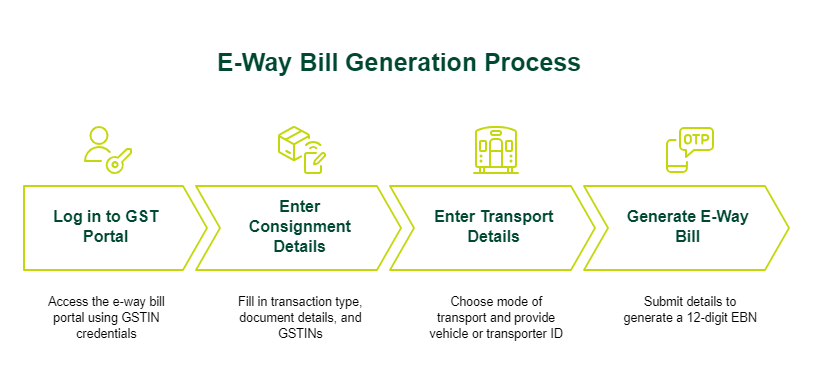
Process to Generate an E-Way Bill: Step-by-Step
Step 1: Log in to the GST E-Way Bill Portal
Log in to the e-way bill portal using your GSTIN credentials and captcha. An OTP-based two-factor authentication is mandatory for access.
Step 2: Enter Consignment Details (Part A)
Enter consignment details in Part A by selecting “Generate New” under the E-Way Bill menu. Fill in transaction type (outward or inward), sub-type (such as supply or job work), document type, number and date, GSTIN of supplier and recipient (use “URP” if unregistered), HSN code, goods value, and applicable Central GST (CGST), State GST (SGST), or Integrated GST (IGST) rates.
Step 3: Enter Transport Details (Part B)
Choose the mode of transport (road, rail, air, or ship), enter the approximate distance, and provide either the vehicle number (for road) or transporter ID and document number (for other modes). This step activates the e-way bill and its validity.
Step 4: Generate the E-Way Bill and EBN
Click Submit. The system validates the information and generates a 12-digit E-Way Bill Number (EBN). This is shared with the supplier, recipient, and transporter. You can print the e-way bill or keep the EBN digitally for verification during transit.
SMS E-Way Bill Generation on Mobile
Registered taxpayers and transporters can generate, manage, and cancel e-way bills via SMS without logging into the portal. To enable this, register the mobile number on the e-way bill portal under Registration > For SMS. Pre-defined SMS command codes are then sent to the GSTN-designated mobile number to initiate e-way bill generation or cancellation. This method is particularly useful for transporters managing multiple consignments on the move.
E-Way Bill for Different Types of Transactions
|
Transaction Type
|
E-Way Bill Requirement
|
|
Outward supply (interstate)
|
Required if the goods value exceeds Rs. 50,000
|
|
Outward supply (intrastate)
|
As per the state-specific threshold
|
|
Branch or stock transfer
|
Required (supply without consideration)
|
|
Sales return
|
Required with sub-type "Sales Return"
|
|
Job work (interstate)
|
Required regardless of value
|
|
Import goods
|
Required from the port or ICD to the destination
|
|
Export goods
|
Required from the consignor to the port or customs point
|
|
Bill to/Ship to transactions
|
Both the billing GSTIN and the shipping address must be in the e-way bill
|
|
Multiple invoices (same parties)
|
Separate e-way bills per invoice; can be clubbed into a Consolidated EWB using Form GST EWB-02
|
Validity of an E-Way Bill
The e-way bill validity is calculated from the date and time of the first Part B entry and expires at midnight on the last valid day.
|
Type of Conveyance
|
Distance
|
Validity
|
|
Standard goods
|
Less than 200 km
|
1 day
|
|
Standard goods
|
Every additional 200 km or part thereof
|
Additional 1 day
|
|
Over Dimensional Cargo (ODC)
|
Less than 20 km
|
1 day
|
|
Over Dimensional Cargo (ODC)
|
Every additional 20 km or part thereof
|
Additional 1 day
|
E-way bill validity example: A consignment travelling 300 km by regular vehicle has a validity of 2 days: 1 day for the first 200 km and 1 additional day for the remaining 100 km.
The e-way bill validity can be extended up to 8 hours before or 8 hours after expiry by providing a valid reason, such as a vehicle breakdown, natural calamity, or transit delay, along with updated Part B details. As of January 1, 2025, extensions are capped at 360 days from the original generation date.
E-Way Bill for Unregistered Persons
Unregistered persons are also subject to e-way bill requirements under specific circumstances:
- Unregistered supplier to registered recipient: The recipient generates the e-way bill and is responsible for compliance.
- Unregistered supplier to unregistered recipient: Either party can enrol as a citizen and generate the e-way bill.
- Handicraft dealers (GST-exempt): Must generate an e-way bill for inter-state movement, for any value.
- Unregistered transporters: Must enrol to get TRANSIN for generating e-way bills on behalf of clients.
Time Limit to Generate an E-Way Bill
From 1st January 2025, e-way bills can only be generated for documents dated within 180 days from the date of e-way bill generation. This means an e-way bill generated on 1st March 2025 can only be raised against invoices/delivery challans dated on or after 3rd September 2024. Documents older than 180 days are ineligible for e-way bill generation under this rule, introduced by the GSTN to prevent backdated document misuse.
Rules for E-Way Bill Under GST
The Goods and Services Tax e-way bill framework is governed by Rule 138 of CGST and associated provisions. Key GST e-way bill rules include:
- The e-way bill must be generated before the movement starts.
- The person in charge must carry the EBN (digital or print) during transit.
- If the validity expires, goods cannot move further until renewed or a new bill is generated.
- GST officers can stop vehicles and verify documents (invoice, challan, tax records).
- Part B is not required if the distance is under 50 km within the same state between the consignor/consignee and the transporter.
Penalties for Non-Compliance
Understanding the e-way bill penalty structure is important for all businesses involved in goods movement:
E-Way Bill Penalty Structure
|
Nature of Default
|
Applicable Fine / Outcome
|
|
Goods transported without an e-way bill
|
Risk of detention, seizure of goods, and possible confiscation of the vehicle.
|
|
Failure to comply with CGST Rule 18(1) (display-related violations)
|
Penalty of up to Rs. 25,000.
|
|
Transporting goods without a valid e-way bill
|
Rs. 10,000 or the amount of tax attempted to be evaded, whichever is higher.
|
|
Transporter not generating an e-way bill when required
|
Rs. 10,000 or the tax amount evaded, whichever is higher.
|
Common Mistakes in the E-Way Bill Generation Process
Being aware of frequent e-way bill mistakes and GST EWB common issues can help businesses avoid disruptions in goods movement. Most e-way bill errors arise due to incorrect data entry, incomplete details, or a lack of timely updates.
- Entering an incorrect GSTIN for the supplier or recipient, leading to validation failures.
- Providing an invalid or non-standard vehicle number format in Part B.
- Not updating Part B details, resulting in only a Part-A slip instead of a valid EWB.
- Using identical PIN codes for the source and destination without a valid distance entry.
- Allowing the e-way bill validity to expire before the goods reach the destination.
- Failing to generate or update the e-way bill during transit changes.
Taking a few minutes to verify details before submission can prevent these issues and ensure smoother compliance.
How to Download an E-Way Bill
For an e-way bill download, log in to the EWB portal using your GSTIN credentials. Navigate to "E-Way Bill" in the left menu and select "Print EWB." Enter the EBN and click Print or Download to save the e-way bill as a PDF. The downloaded document can be used as the official copy during transit.
Tips to Avoid E-Way Bill Penalties
Following these practices helps maintain GST e-way bill compliance consistently:
- Generate the e-way bill before goods leave the premises, not after loading begins.
- Double-check the GSTIN of both the supplier and the recipient before submission.
- Verify that the HSN Code and consignment value are correctly entered and match the invoice.
- Confirm the vehicle registration number is in the correct format before entering it in Part B.
- Monitor e-way bill validity actively and extend it well before expiry if transit delays occur.
- Train staff responsible for generating e-way bill online on the latest rules.
- Conduct periodic internal audits of e-way bill records against invoice records to spot discrepancies early.
How to Cancel or Amend an E-Way Bill?
A generated e-way bill can be cancelled within 24 hours of generation, provided it has not already been verified by a GST enforcement officer during transit. To cancel, log in to the e-way bill portal, navigate to "E-Way Bill" and select "Cancel." Enter the EBN and provide a cancellation reason. Once cancelled, the EBN becomes invalid. E-way bills cannot be amended after generation. If an error is discovered, cancel the incorrect e-way bill and generate a fresh one with the correct details.
Latest Updates in E-Way Bill System
Key updates to the e-way bill GST system in the recent past:
- Second Portal: e-waybill2.gst.gov.in, running in real-time sync with the primary portal to improve system availability and reduce downtime.
- Two-Factor Authentication (2FA): Mandatory for all taxpayers when logging in to the e-way bill portal.
- 180-day Document Rule: E-way bills can only be generated against documents dated within 180 days of the generation date.
- Extension Cap: E-way bill validity extensions are capped at 360 days from the original generation date.
Conclusion
The e-way bill GST system is a non-negotiable component of tax compliance for all businesses involved in goods movement in India. From understanding e-way bill applicability and threshold limits to generating the bill correctly and avoiding common errors, every step in the process carries compliance and financial consequences.
Keeping up with the latest rule changes, training teams on e-way bill generation online procedures, and maintaining accurate records are the most effective ways to prevent penalties and support smooth business operations.
As businesses manage these compliance requirements alongside regular expenses, maintaining steady cash flow becomes equally important. SMFG India Credit can support your financial needs with business loans of up to Rs. 1 crore* at competitive interest rates. Check your eligibility and apply online or contact us for more details.
Explore More on GST