GSTR-9 filing is the yearly checkpoint every GST-registered business has to complete to stay compliant. If your business crosses the turnover threshold, your GSTR-9 annual return consolidates every GSTR-1 and GSTR-3B you submitted during the financial year into one document.
This GST annual return filing pulls together sales, purchases, Input Tax Credit (ITC), and tax paid in one place, giving the Goods and Services Tax (GST) department and your own books a clean annual summary. Filing GSTR-9 on time protects you from late fees, supports clean records for loan applications, and keeps your GST compliance record intact.
What Is GSTR-9?
GSTR-9 is the annual summary return that every regular GST-registered taxpayer files once a financial year.
The GSTR-9 meaning is simple: it is a single form that consolidates all your outward supplies, inward supplies, Input Tax Credit (ITC) availed and reversed, tax liability, and tax paid during the year.
Latest Updates on GSTR-9 Filing (2026)
Several changes have been recently brought in for GSTR-9 filing onwards that you should know about before you start your annual return. The GSTR-9 latest updates include:
- Turnover Exemption Reconfirmed: Under CBIC Notification No. 15/2025-Central Tax, taxpayers with aggregate turnover up to ₹2 crore continue to be exempt from filing GSTR-9.
- New ITC Reporting Fields: CBIC Notification No. 13/2025-Central Tax amended the CGST Rules to introduce additional ITC reporting fields in the form.
- IMS-based Auto-population: Notification No. 16/2025-Central Tax updated the GSTR-9 format to allow IMS-based ITC auto-population and new reversal disclosures.
- Filing After Due Date Allowed: From January 2026, GSTR-9 and GSTR-9C can be filed even after 31 December, subject to late fees, with a hard 3-year limitation rule now in force.
GSTR-9 Due Date and Timeline: When to File?
The GSTR-9 due date is the 31st of December following the end of the financial year. For FY 2025-26, the due date is 31st December 2026. The Government of India may extend the deadline through notifications, so it helps to watch the GST portal during the quarter leading up to December.
Miss the GSTR-9 due date, and late fees begin to accrue from the very next day. Under the January 2026 change, you can still file your GSTR-9 annual return after the due date, but the cost rises with each day of delay, so early filing saves money and effort.
Applicability and Eligibility for GSTR-9 Filing
Now, the question is who should file GSTR-9?
Your GSTR-9 applicability depends on your GST registration type and annual turnover. You must file one GSTR-9 per GSTIN, which means a business with multiple registrations across states files one GSTR-9 per state.
The following categories are not required to file GSTR-9:
- Taxpayers under the composition scheme (they file GSTR-9A or CMP-08 as applicable)
- Input Service Distributors (ISD)
- Casual taxable persons
- Non-resident taxable persons
- Persons paying TDS under Section 51 of the CGST Act or collecting TCS under Section 52
GSTR-9 Turnover Limit: Thresholds for Mandatory Filing
The GSTR-9 turnover limit sets a clear cut-off between mandatory and optional filing. If your aggregate annual turnover across India is above ₹2 crore, GSTR-9 filing is mandatory. If your turnover is ₹2 crore or less, filing is optional for FY 2024-25 as per CBIC Notification No. 15/2025-Central Tax.
Aggregate turnover here includes:
- Taxable supplies
- Exempt supplies
- Exports
- Inter-state supplies
- Supplies made on behalf of principals
All calculated on a PAN-India basis. Cross the GSTR-9 turnover limit in any single financial year, and you are required to file. A separate threshold applies to GSTR-9C, which is the reconciliation statement required when your aggregate turnover is above ₹5 crore.
Types of Annual Returns
There are four main forms in the GST annual return family, and knowing the difference helps you pick the correct one.
|
GST Annual Return Type
|
Who Files It
|
Turnover Trigger
|
|
GSTR-9
|
Regular GST taxpayers filing GSTR-1 and GSTR-3B
|
Mandatory if turnover is above ₹2 crore
|
|
GSTR-9A
|
Composition scheme taxpayers (kept in abeyance for multiple years; composition dealers file CMP-08 quarterly and GSTR-4 annually)
|
Applies to composition dealers
|
|
GSTR-9B
|
E-commerce operators collecting TCS and filing GSTR-8 monthly
|
Applies to specific e-commerce operators
|
|
GSTR-9C
|
Self-certified reconciliation statement filed along with GSTR-9
|
Mandatory if turnover is above ₹5 crore
|
GSTR-9 Format & Sections Explained
The GSTR-9 format is built to bring together every part of your annual GST activity. The form is divided into 6 parts and 19 tables, and each part asks for data that you can pull from your GSTR-1, GSTR-3B, and books of accounts.
The broad GSTR-9 structure is:
- Part I: Basic details including GSTIN, legal name, and financial year
- Part II: Details of outward supplies and inward supplies liable to reverse charge
- Part III: Details of ITC availed, ITC reversed, and other ITC-related information
- Part IV: Details of tax paid as declared in returns filed during the year
- Part V: Particulars of transactions for the previous FY declared in returns the current FY
- Part VI: Other information, such as demands, refunds, HSN summary, and late fees payable
Overview of GSTR-9 Sections
|
Section (Part)
|
Key Tables
|
What Goes Here
|
|
Part I
|
Tables 1 to 3
|
GSTIN, legal and trade name, financial year
|
|
Part II
|
Tables 4 and 5
|
Taxable, exempt, nil-rated, non-GST outward supplies, reverse charge
|
|
Part III
|
Tables 6, 7, 8
|
ITC availed, ITC reversed, ITC reconciliation with GSTR-2A/2B
|
|
Part IV
|
Table 9
|
Tax paid under CGST, SGST, IGST, cess
|
|
Part V
|
Tables 10 to 14
|
Amendments, prior period adjustments, differential tax paid
|
|
Part VI
|
Tables 15 to 19
|
Demands and refunds, deemed supplies, HSN summary, late fees
|
This GSTR-9 example of structure helps you plan data extraction before you start filling the form.
How to File GSTR-9: Step-by-Step Process
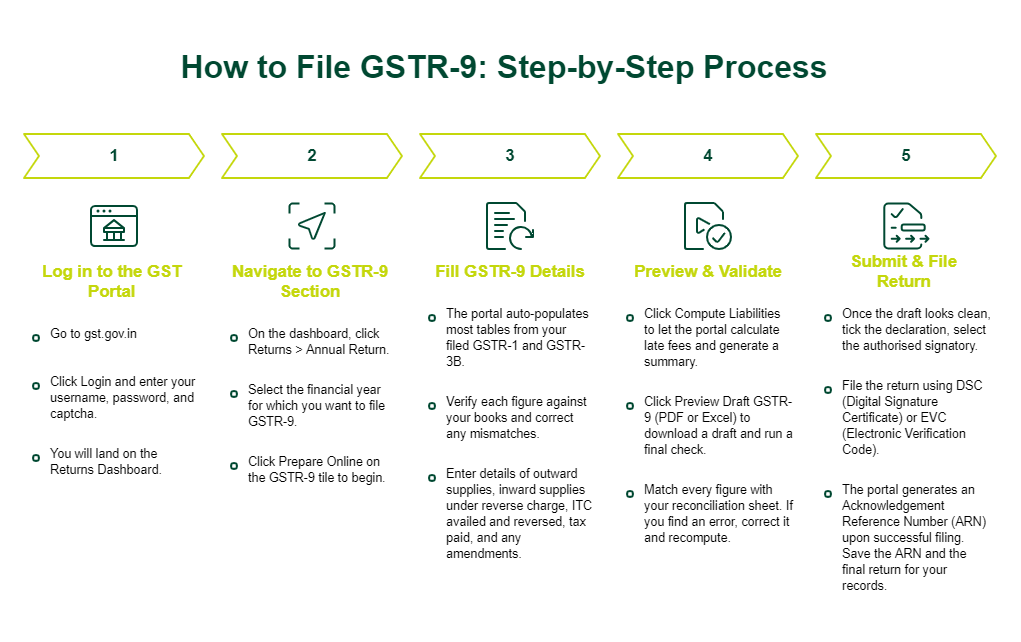
Before you open the form, complete every pending GSTR-1 and GSTR-3B for the year. Once those are clear, the GSTR-9 filing process on the GST portal is straightforward. It remains the same regardless of your turnover; only the volume of data changes.
Knowing how to file GSTR-9 end-to-end saves you hours at the year-end crunch. The detailed GSTR-9 filing process below takes you from login through final submission, covering what the portal does and what you need to do.
Step 1: Log in to the GST Portal
Go to gst.gov.in, click Login, and enter your username, password, and captcha. This is the same GST portal login you use for GSTR-1 and GSTR-3B. Once inside, you land on the Returns Dashboard, which is the starting point for every GST annual return filing activity, including GSTR-9.
Step 2: Navigate to GSTR-9 Section
On the dashboard, click Returns > Annual Return. Select the financial year for which you want to file GSTR-9, and the portal opens the return tile. Click Prepare Online on the GSTR-9 tile to begin. The portal also gives you an offline utility if you prefer to prepare your GSTR-9 in a downloaded tool.
Step 3: Fill GSTR-9 Details
This is the core of the GST annual return details. The portal auto-populates most tables from your filed GSTR-1 and GSTR-3B, but you must verify each figure against your books. Enter details of outward supplies, inward supplies under reverse charge, ITC availed and reversed, tax paid under CGST, SGST, IGST, and any amendments made in April to September of the next FY. Correct any mismatch you spot before moving on.
Step 4: Preview & Validate
Click Compute Liabilities to let the portal calculate late fees, if any, and generate the GSTR-9 summary. Click Preview Draft GSTR-9 (PDF or Excel) to download a draft and run a final check. This is the GSTR-9 verification stage, so match every figure with your reconciliation sheet. If you find an error, return to the respective table, correct it, and recompute.
Step 5: Submit & File Return
Once the draft looks clean, tick the declaration, select the authorised signatory, and file the return using DSC / EVC. DSC is required for companies and LLPs, while EVC (OTP-based) works for proprietors and partnerships. The portal generates an Acknowledgement Reference Number (ARN) when your GSTR-9 is filed successfully. Save the ARN and the final return for your records.
GSTR-9 Filing Checklist
A clear GSTR-9 checklist keeps your filing smooth and error-free.
Keep the following GSTR-9 filing requirements ready:
- All GSTR-1 and GSTR-3B returns for the financial year filed and accepted
- Books of accounts finalised for the year, with ledgers matching returns
- GSTR-2B reconciliation complete, with ITC mismatches identified
- HSN summary prepared for outward and inward supplies
- Valid DSC / EVC ready for the authorised signatory
- Late fee liability computed, if filing after the GSTR-9 due date
GSTR-9 Late Fees, Penalties & Interest
Failure to file your annual return on time attracts GSTR-9 late fees under Section 47 of the CGST Act. A delay leads to ₹100 per day under CGST and ₹100 under SGST/UTGST, totalling ₹200 per day, subject to a cap of 0.25% of turnover in the respective state. These penalties for the GSTR-9 annual return continue until filing is completed. If any additional tax liability is identified and remains unpaid, interest at 18% per annum applies from the due date until payment. Non-compliance may also result in notices, scrutiny, or audit risks, making timely filing essential to avoid penalties for the GSTR-9 annual return.
Overview of GSTR-9 Late Fees & Charges
|
Component
|
GSTR-9 Penalty Details
|
|
Late Fee (CGST)
|
₹100 per day
|
|
Late Fee (SGST/UTGST)
|
₹100 per day
|
|
Total Late Fee
|
₹200 per day of delay
|
|
Maximum Late Fee
|
0.25% of turnover (per state/UT)
|
|
Interest on Tax Dues
|
18% per annum
|
|
Applicability
|
On unpaid tax liability post due date
|
Common Errors in GSTR-9 Filing
A few GSTR-9 errors commonly show up year after year during filing. Spotting them early saves you from notices and revisions.
Avoid the following GST annual return mistakes:
- Outward supplies reported in GSTR-1 do not match the tax paid in GSTR-3B.
- Claimed ITC is higher than what appears in GSTR-2B, which triggers auto-population issues.
- Missing or wrong HSN codes, especially for the inward supplies.
- Reverse charge for inward supplies either missed or double-counted.
- Selecting the wrong FY on the portal leads to stuck drafts.
- Forgetting that late fees apply per act (CGST plus SGST) and adding only once.
Reconciliation Tips for GSTR-9
Good GSTR-9 reconciliation saves you from penalties and officer queries. Run the following checks at least a month before the GSTR-9 due date.
- Match your books of accounts with the turnover in GSTR-1 for every month.
- Match the output tax in GSTR-3B with GSTR-1 and adjust for amendments.
- Reconcile the ITC claimed in GSTR-3B with GSTR-2B, and flag any excess claim.
- Match reverse charge liability with the reverse charge ledger.
- Reconcile cash and credit ledger balances on the GST portal with your books.
Conclusion
Your GSTR-9 serves as the final summary of a year’s GST activity, and accurate filing helps avoid late fees, departmental queries, and potential delays in loan processing. Use this GST annual return guide to plan your GSTR-9 filing well in advance, complete a thorough reconciliation, and file through the GST portal using DSC or EVC. Staying proactive with your filings supports a consistent and reliable GST compliance return approach for your business.
Managing GST obligations alongside day-to-day operations and growth plans requires steady working capital. To support your enterprise needs, SMFG India Credit offers business loans of up to Rs. 1 crore*, without collate1 croreral and at competitive interest rates. Apply online or contact us for more details.
Explore More on GST
* Please note that this article is for your knowledge only. Loans are disbursed at the sole discretion of SMFG India Credit. Final approval, loan terms, disbursal process, foreclosure charges and foreclosure process will be subject to SMFG India Credit's policy at the time of loan application. If you wish to know more about our products and services, please contact us