Eligible registered taxpayers are required to make a GST challan payment to deposit their tax payment, interest, penalty, late fee, or any other applicable dues with the government.
To complete the GST tax payment, a challan must first be generated through the GST Portal using the relevant GSTIN, after which the transaction can be completed using one of the available GST payment online modes. Once the payment is successfully processed, the amount is credited to the electronic cash ledger and can be used to discharge the applicable tax liability.
What Is GST Challan Payment?
The GST challan payment meaning refers to the process of generating a GST payment challan on the GST Portal to pay the Goods and Services Tax, interest, penalty, late fee, or other applicable dues.
After the GST challan is generated, a unique CPIN is created, which is used to complete the payment through an authorised bank or other approved payment mode. Once the payment is successfully processed, a CIN is generated, and the amount is credited to the taxpayer's electronic cash ledger for utilisation against GST liabilities.
What Is a GST Challan?
The GST challan meaning refers to the payment instrument generated through the GST Portal to deposit GST, interest, penalty, late fee, or other applicable dues. A GST challan online is created before making a payment and serves as the basis for completing the transaction. A correctly generated GST payment challan helps ensure that the payment is credited to the appropriate taxpayer account.
A GST challan typically includes the following details:
- GSTIN of the taxpayer
- Registered legal name
- Applicable tax head (such as CGST, SGST/UTGST, IGST, Cess, Interest, Penalty, or Fee)
- Amount payable under each tax head
- Unique CPIN generated for the challan
- Selected payment mode for completing the transaction
Key Terms Used in GST Challan Payment
Before making a Goods and Services Tax challan payment, it is helpful to understand the key GST payment terms used during the process. Knowing the CPIN meaning in GST, CIN meaning in GST, along with terms such as the BRN, GST PMT-06, electronic cash ledger, and authorised bank, helps you understand the different stages of challan generation and payment processing.
CPIN, CIN and BRN Meaning
|
Term
|
Full Form
|
Meaning
|
When Generated
|
|
CPIN
|
Common Portal Identification Number
|
The GST CPIN meaning refers to a unique number assigned to a challan created on the GST Portal.
|
Before payment, when the challan is generated.
|
|
CIN
|
Challan Identification Number
|
The GST CIN meaning indicates a unique reference generated by the bank after successful payment.
|
After payment confirmation.
|
|
BRN
|
Bank Reference Number
|
A reference number assigned by the bank to track the payment transaction.
|
During bank payment processing.
|
|
GST PMT-06
|
GST Payment Challan
|
The prescribed challan used to deposit GST and other applicable dues.
|
At the time of challan generation.
|
Understanding CPIN vs CIN can help taxpayers track their payments more effectively and verify whether the amount has been successfully credited.
Who Needs to Make GST Challan Payment?
A registered taxpayer is generally required to make a GST challan payment whenever there is an outstanding GST liability that needs to be deposited with the government. GST payment for taxpayers may be required before or after filing returns, depending on the nature of the payment. The facility is also used for payments in various situations, including the payment of interest, penalties, and other statutory dues.
GST tax payment online may be required by:
- Regular registered taxpayers paying their tax liability
- A composition taxpayer depositing tax under the Composition Scheme
- Businesses paying any shortfall in GST payable
- Taxpayers paying interest, penalty, or late fee
- Persons making GST payments before or after filing the applicable return, as required
Maintaining timely tax compliance and payment records can also support your financial profile when applying for credit products such as a business loan.
Keeping GST challans along with other financial records can also help you organise the business loan documents required during the loan application process.
When Is GST Challan Payment Required?
A GST challan payment is required whenever a taxpayer needs to deposit GST or other statutory dues with the government. This commonly includes GST payment before return filing to discharge the tax payable in GSTR-3B, as well as payments made after filing, where applicable. Once the amount is deposited, it is credited as a GST cash ledger payment, which can then be used to offset eligible liabilities.
GST challan payment is generally required for:
- Paying cash liability reported in GSTR-3B
- Depositing GST before filing the applicable return
- Paying applicable interest on delayed tax payments
- Paying a late fee for delayed return filing
- Paying a penalty under the GST provisions
- Making a demand payment against a tax notice
- Making a voluntary payment, where permitted under the GST law
GST Challan Payment Modes
The GST Portal offers multiple GST payment modes to help taxpayers deposit their dues conveniently. Depending on the amount payable and the facilities provided by the authorised bank, you can make Goods and Services Tax payment online through e-payment or internet banking, or use Over the Counter, NEFT, or RTGS where applicable. The availability of these GST online payment modes may vary based on the portal and banking guidelines.
|
Payment Mode
|
How It Works
|
|
E-Payment / Internet Banking
|
Complete the payment directly through the GST Portal using the net banking facility of an authorised bank.
|
|
Over the Counter
|
Make the payment at a designated bank branch using cash, cheque, or demand draft, subject to the applicable limits and GST rules.
|
|
NEFT / RTGS
|
Generate a challan on the portal and complete the GST payment through your bank using the NEFT or RTGS facility, where available.
|
GST Payment Modes Comparison
|
Payment Mode
|
Best For
|
Key Requirement
|
Credit to Electronic Cash Ledger
|
|
Internet Banking
|
Routine online GST payments
|
Net banking access with an authorised bank
|
Usually credited shortly after successful payment
|
|
NEFT
|
Taxpayers preferring bank transfers
|
Challan generation and bank processing as per the NEFT procedure
|
Credited after the bank confirms the transaction
|
|
RTGS
|
High-value payments
|
Challan generation and RTGS processing through the bank
|
Credited after the bank confirms the transaction
|
|
OTC
|
Eligible low-value offline payments
|
Payment by cash, cheque, or demand draft, subject to applicable limits
|
Credited after the payment is realised and processed
|
This table compares the commonly available online GST payment modes and offline options. The time taken for the amount to reflect in the electronic cash ledger may vary depending on the payment method and bank processing timelines.
How to Generate GST Challan on the GST Portal
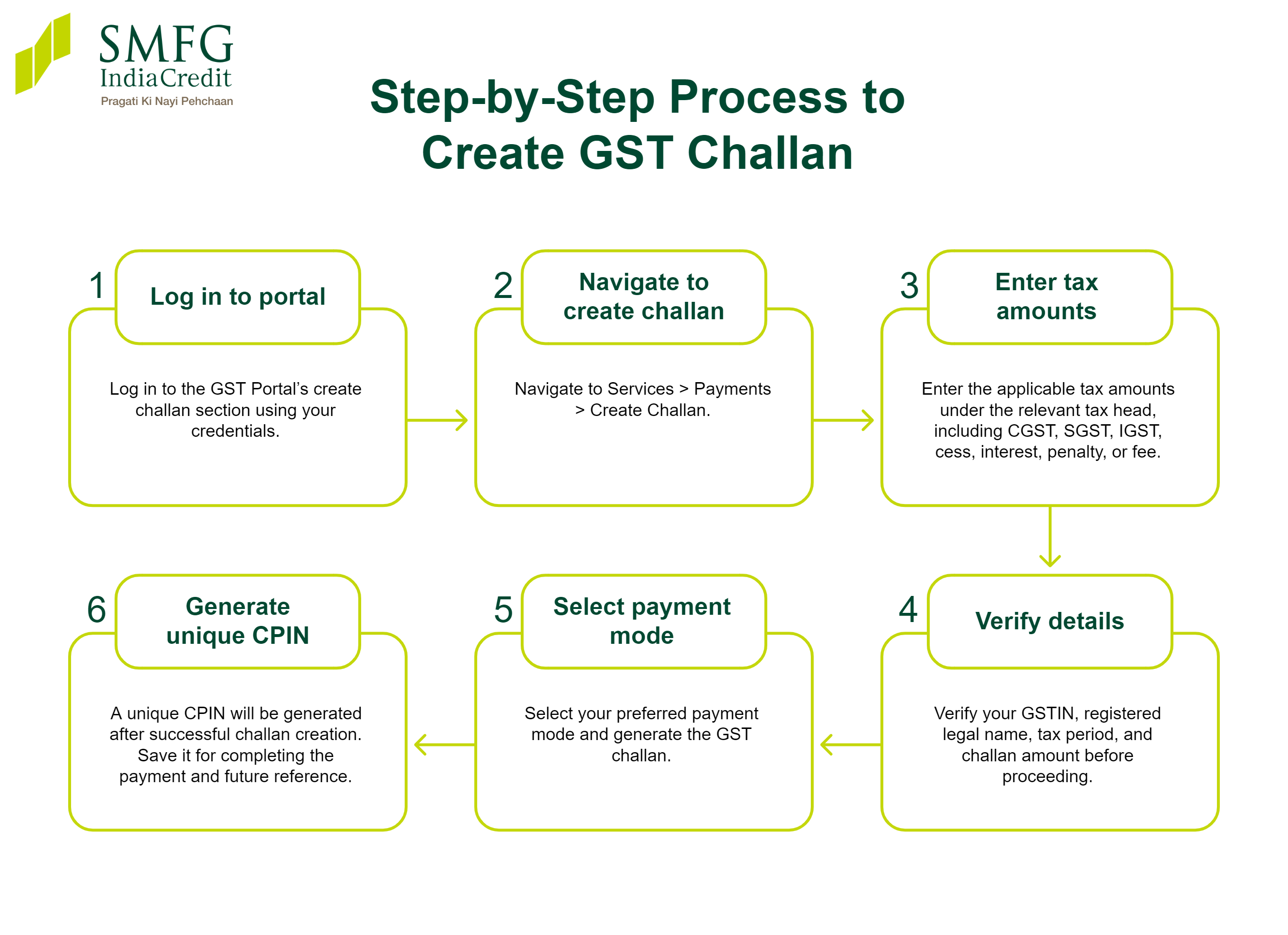
Before making a GST payment, taxpayers must generate a challan on the GST Portal. If you are wondering how to create a GST challan online, the process involves preparing a GST PMT-06 challan, entering the applicable tax amounts under CGST, SGST, IGST, cess, interest, penalty, or fee, selecting a payment mode, and generating the challan. You can also access your challan history through the portal to view previously generated challans.
Step-by-Step Process to Create GST Challan
- Log in to the GST Portal’s create challan section using your credentials.
- Navigate to Services > Payments > Create Challan.
- Enter the applicable tax amounts under the relevant tax head, including CGST, SGST, IGST, cess, interest, penalty, or fee.
- Verify your GSTIN, registered legal name, tax period, and challan amount before proceeding.
- Select your preferred payment mode and generate the GST challan.
- A unique CPIN will be generated after successful challan creation. Save it for completing the payment and future reference.
These GST challan creation steps help ensure that the payment is correctly mapped to your tax liability.
How to Generate GST Challan Payment Online Through Internet Banking
Once a challan has been created, you can complete the GST challan payment online using GST payment through net banking. Select internet banking as the payment mode, choose an authorised bank, and proceed to the bank's payment page to pay GST online. After the transaction is successfully completed, a CIN is generated against the CPIN, and the amount is credited to your electronic cash ledger on the GST Portal.
Step-by-Step GST Online Payment Process
To pay the GST challan online:
- Generate a GST challan on the GST Portal.
- Select Internet Banking and choose your authorised bank.
- Note the CPIN and proceed to the bank's payment page.
- Log in to your net banking account and complete the payment.
- After successful payment, a CIN will be generated and the amount will be credited to your electronic cash ledger.
- Download and save the GST payment receipt for your records.
- Verify the transaction and updated balance in the electronic cash ledger to complete the GST online payment steps successfully.
How to Generate GST Challan Payment Through NEFT/RTGS
You can make GST payment through NEFT/RTGS by selecting this option while generating a challan. A GST payment mandate form linked to the CPIN is then generated. Follow these steps:
- Select NEFT/RTGS while creating the challan.
- Download or print the mandate form.
- Complete the transfer through an authorised bank using the details provided.
- After the bank confirms the payment, a CIN is generated.
- Verify that the amount has been credited to the electronic cash ledger. The mandate form remains valid only for the challan validity period.
How to Make GST Payment Over the Counter
You can make a GST payment over the counter by selecting this payment mode while generating a challan on the GST Portal. This option allows eligible taxpayers to complete a GST challan cash payment or pay using a cheque or demand draft at an authorised bank, subject to the applicable GST and banking guidelines. The payment must be completed within the GST challan validity period.
- Generate a GST challan on the GST Portal.
- Select GST OTC payment as the preferred payment mode.
- Print the generated challan.
- Visit the selected authorised bank branch.
- Make the payment using cash, cheque, or demand draft, as applicable.
- Collect the acknowledgement and verify that the payment has been processed after the bank completes the transaction.
GST Challan Validity
A GST challan has a limited validity period to ensure that payments are completed within a specified timeframe. Under the Goods and Services Tax rules, the GST challan validity and CPIN validity are generally 15 days from the date of generation on the GST Portal. If the payment is not completed within this period, the GST challan expired status applies, and the expired challan can no longer be used. In such cases, taxpayers must generate a new challan before making the payment.
GST Payment Due Date for Different Taxpayers
The GST payment due date varies depending on the category of taxpayer and the applicable return filing scheme. Making GST bill online payments within the prescribed timelines helps ensure timely compliance and avoids interest or late fees. The GST payment last date generally applies as follows:
- Regular Taxpayers: GST payment is generally due by the 20th of the month following the relevant tax period.
- Composition Scheme Taxpayers: GST payment is generally due by the 18th of the month following the end of the quarter.
- QRMP Scheme Taxpayers: Tax for the first two months of the quarter is generally paid by the 25th of the following month, via the GST PMT-06 form.
What Is the Time Limit to Complete GST Payment?
After generating a GST challan, the payment should be completed within its validity period. For GST payment online, the challan is generally valid for 15 days from the date of generation. If the payment is not completed within this period, the challan expires, and a new one must be generated before the payment can be made.
GST Payment Forms
Different GST payment situations require different forms, so it is important to use the correct one. Form GST PMT-06 is used to generate a challan and deposit GST payable, interest, penalty, late fee, or other dues into the electronic cash ledger. Form GST CMP-08 is used by taxpayers registered under the Composition Scheme to declare self-assessed tax and make quarterly tax payments. Using the appropriate form helps ensure accurate payment and GST compliance.
How to Check GST Payment Status
After making a payment, you can check the GST payment status through the portal to confirm that the amount has been successfully credited. You can access your GST payment history or challan history to track the payment and verify that it has been reflected in your electronic cash ledger.
- Log in to the GST payment portal.
- Go to Services > Payments > Challan History or Payment History.
- Enter the CPIN or CIN, where required.
- View the GST challan status and payment details.
- Verify that the amount has been credited to your electronic cash ledger.
Keeping your tax payments and other financial obligations up-to-date can also support future business financing. Before applying, you can use a business loan eligibility calculator to estimate your borrowing capacity based on your income, existing obligations, and other key financial factors.
How to Download GST Payment Receipt/Paid Challan
Once your GST payment is successfully processed, you can access the receipt through the GST Portal for future reference. The downloaded receipt includes important details such as the CIN, bank reference number, payment amount, and transaction date. Keeping a copy of the receipt can help during reconciliations, audits, or whenever proof of payment is required.
- Log in to the GST Portal.
- Go to Services > Payments > Challan History.
- Select the relevant paid challan from the list.
- Review the payment details and choose the GST payment receipt download option.
- Save or print the receipt for your records. You can use this method to download a GST challan whenever required.
Common Issues During GST Challan Payment
While making a GST payment, taxpayers may occasionally encounter technical or procedural errors. Most GST challan payment issues can be resolved by verifying the challan details, checking the payment status, or waiting for the bank and GST systems to synchronise. If a GST payment failed or the GST payment was not reflected even after a reasonable time, you may need to contact your bank or raise a grievance through the GST Portal.
GST Payment: Common Issues & Solutions
|
Issue
|
Possible Reason
|
What to Do
|
|
Payment failed
|
Network or banking error
|
Retry the transaction or raise a grievance, if required, after checking the payment status.
|
|
Amount debited, but CIN not generated
|
Bank confirmation not received by the GST Portal
|
Wait for the prescribed time. If unresolved, contact the bank or raise a grievance.
|
|
Payment not reflected in the electronic cash ledger
|
Processing delay
|
Check the cash ledger after some time and verify the payment status.
|
|
Wrong GST challan generated
|
Incorrect tax head or amount selected
|
Generate a fresh challan with the correct details and complete the payment.
|
|
Challan expired
|
CPIN validity has lapsed
|
Create a new challan and make the payment within the validity period.
|
|
Duplicate challan
|
Challan created more than once
|
Use the valid paid challan and ignore unpaid duplicates.
|
|
Bank page timeout
|
Session expired during payment
|
Check whether a bank debit occurred before attempting another payment.
|
|
Incorrect GSTIN
|
Data entry error
|
Cancel the unpaid challan and generate a new one with the correct GSTIN.
|
|
Pending payment status
|
Payment is still under processing
|
Wait for confirmation before initiating another transaction as part of the appropriate GST payment problem solution.
|
What to Do If GST Challan Expires
A GST challan expired status means the challan was not paid within its validity period and can no longer be used for making a payment. In such cases, you must generate a fresh challan through the GST Portal before attempting the payment again. If you completed the payment before the challan expired but the status remains unclear, check the CPIN expired payment status and verify whether a CIN has been generated. If the issue persists, contact your bank or raise a query through the GST Portal for further assistance.
Can You Edit or Cancel a GST Challan After Generation?
Once a challan has been generated, you typically cannot edit GST challan details or cancel a GST challan through the GST Portal. If a wrong GST challan generated remains an unpaid challan, it is advisable to generate a new challan with the correct details. For a paid challan, any refund or adjustment depends on the applicable GST provisions, the relevant tax head, and the nature of the payment. Therefore, taxpayers should carefully verify all details before generating a challan.
Common Mistakes to Avoid While Making GST Challan Payment
Small errors during the payment process can lead to delays, reconciliation issues, or the need to generate a new challan. Being aware of common GST challan payment mistakes can help you complete the transaction correctly the first time. Before confirming your payment, review the challan details carefully and keep a record of the transaction for future reference. Taking a few extra minutes to verify the information can help minimise GST payment errors and make subsequent record-keeping easier.
- Verify the Tax Head: Ensure you select the correct tax head before generating the challan.
- Check Your GSTIN: Confirm that the GSTIN entered is accurate to avoid payment being linked to the wrong taxpayer.
- Choose the Right Payment Mode: Select a payment method that is suitable and supported by your bank.
- Save the CIN and Receipt: Keep the CIN and payment receipt for future verification and reconciliation.
- Avoid Duplicate Challans: Do not create multiple challans for the same liability unless required.
- Track Challan Validity: Complete the payment before the challan validity period expires.
- Verify the Electronic Cash Ledger: After payment, check the electronic cash ledger to confirm the amount has been credited and to avoid common GST challan mistakes.
Conclusion
Completing your Goods and Services Tax payment online accurately and on time helps maintain compliance while reducing the chances of payment delays or reconciliation issues. From generating a challan to verifying the transaction and downloading the receipt, understanding each step of the GST e-payment process can make tax obligations more efficient and easier to manage.
If you are looking to support your business's growth alongside maintaining financial compliance, explore SMFG India Credit's business loan solutions of up to Rs. 1 crore*.
Eligible applicants can benefit from competitive business loan interest rates on financing for meeting working capital requirements, expanding operations, or managing other business-related expenses.
Estimate your monthly repayments using a business loan EMI calculator and apply online today.