When you apply for GST registration, the government issues you an Application Reference Number (ARN) that acts as your tracking ID. Checking your GST ARN status lets you see where your application stands, spot problems early, and confirm the moment your GSTIN has been issued. Knowing how to check GST registration status helps you respond quickly if the GST officer asks for clarification.
This guide walks you through each step, every status type, and every method you can use to track your GST ARN status online.
What Is an ARN Number in GST?
ARN stands for Application Reference Number. It is a 15-character code generated on the GST portal the moment you submit your GST REG-01 form and complete OTP verification. The GST ARN number is the unique identifier for your registration request, and it is what you use to track your GST ARN status from submission until approval or rejection.
Without the GST ARN number, you cannot monitor your application status through the portal, SMS, or email. The ARN GST code remains valid throughout the registration process and is shared with you on your registered mobile number and email the moment the system accepts your form.
Decoding the GST ARN Format
The ARN number structure has meaning built into it, so once you know the format, you can read it yourself.
GST ARN example: AA070724000001Z
- First 2 characters (AA): fixed alphabets assigned by the GST Network (GSTN)
- Next 2 characters (07): state code of the applicant
- Next 4 characters (0724): month and year of application (July 2024)
- Next 6 characters (000001): system-generated sequence number
- Last 1 character (Z): check code for validation
Why Is the GST ARN Number Important?
The ARN is used to track your GST application progress before your GSTIN is issued. It carries real weight for business owners who need confirmation of registration before issuing tax invoices or applying for working capital.
The importance of the ARN number is evident through the following benefits:
- Lets you check your GST ARN status anytime on the portal
- Helps you spot a "Pending for Clarification" notice and respond on time
- Proves to clients and stakeholders that your GST registration is in process
- Confirms your application has been accepted by the GSTN
- Acts as a reference in any follow-up with the GST officer
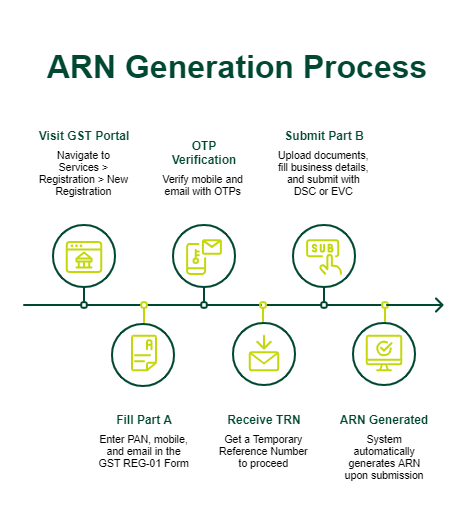
ARN Number Generation Process
The GST ARN generation process is fully online and takes only a few steps.
- Visit the GST portal and open Services > Registration > New Registration.
- Fill Part A of the GST REG-01 Form with your PAN, mobile, and email.
- Complete OTP verification on your mobile and email.
- Receive a Temporary Reference Number (TRN) to continue Part B.
- Upload documents, fill in business details, and submit the form using DSC or EVC.
- Once submitted, the system generates your ARN automatically.
Documents Required Before Checking GST ARN Status
You do not need many documents to check the GST ARN status online, but keeping the right details ready helps.
Be prepared for the following ARN status requirements:
- Your 15-character ARN number (check your email or SMS if you’re wondering how to find the ARN number in GST records)
- Your registered mobile number, for OTP if prompted
- Login credentials for the GST portal, if you plan to check after login
- GSTIN, if already issued, and you want to verify details
How to Check GST Application Status
You can check the GST application status in more than one way. The GST portal gives you two primary options: before login (using only the ARN) and after login (using your dashboard). Beyond the portal, you also get SMS alerts and email notifications as your GST ARN status changes.
If you have been wondering how to check the ARN no. in the GST portal, both the pre-login and post-login paths cover it. Picking the method that suits you depends on whether you already have portal access or not.
GST Application Status Without Login
This is the fastest method for a first-time applicant.
Follow these steps to check GST status without login:
- Access the GST portal.
- Click on Services > Registration > Track Application Status.
- Select "Registration" as the module from the dropdown.
- Enter your ARN in the text box and click on Search.
The portal then displays your GST ARN status, stage of processing, and current update. This method works without a password and is the standard way to check your GST registration status using ARN.
GST Application Status After Login
If you already have portal access, logging in gives you a fuller picture.
Steps to follow to check your GST status after login:
- Visit gst.gov.in and click Login.
- Enter your username, password, and captcha.
- Go to the GST dashboard.
- Click Services > Track Application Status.
- Select module and date range, or enter ARN directly.
How to Track GST ARN Status Online?
Tracking GST ARN application status online is simple once you know the path. The portal is built to let you check without creating an account, which works well for businesses waiting on their first registration. The core flow has four steps that anyone can follow in just a few minutes.
Step 1: Visit the GST Portal
This is the GST official website, run by the Goods and Services Tax Network (GSTN) under the Government of India for every Goods and Services Tax (GST) service.
Do not use third-party links for GST portal login, as the GST status check online details must come from the source. The home page loads quickly and is the starting point for your GST ARN status check.
Step 2: Navigate to Track Application Status
Hover over the Services tab in the top menu. From the dropdown, click Registration, then click Track Application Status. You land on the GST status section, where you can run a GST ARN track application status check by ARN or SRN.
If you want status by GSTIN or submission date, the same page offers those options after login.
Step 3: Enter the ARN
In the input box, type your 15-character ARN exactly as received. A single wrong digit returns an error, so copy it from your registration email or SMS. Once entered, type the captcha and click Search.
The portal accepts GST tracking ARN input in both upper and lower case, and running a GST track by ARN works the same way for both new and resubmitted applications.
Step 4: View GST Status
The screen displays your GST application status result, including the current stage, date of update, and next action, if any. If the status shows "Approved", your GSTIN is ready, and the GST certificate download by ARN number is available from your dashboard.
If it shows "Pending for Clarification", open the notice and respond within the deadline. Save or print the page for your records.
Types of GST ARN Application Status
Your GST ARN status changes as the application moves through verification. The portal uses standard labels for the different GST ARN status entries, so once you learn them, you can read any update at a glance.
GST ARN Status & Meaning
The table below covers the different GST ARN status labels you may see on the portal, with the GST ARN status & meaning for each.
|
GST ARN Status
|
Meaning
|
|
Pending for Processing
|
The application has been submitted and is waiting for the GST officer to pick it up
|
|
Application Withdrawn
|
The taxpayer has withdrawn the application
|
|
Pending for Clarification
|
The officer has raised a query and you must respond
|
|
Approved
|
The GSTIN has been issued and registration is complete
|
|
Rejected
|
The application has been rejected with the reasons stated
|
Other Ways to Check GST ARN Status
Besides the portal, you can track GST ARN application status through two channels.
- SMS Alerts: The GSTN sends automatic SMS updates to your registered mobile each time your GST ARN status changes. No action is needed from your side.
- Email Notifications: Updates also arrive at your registered email, often with attachments for notices or approval letters.
- GST mobile app: The GST mobile app, available on Android and iOS, lets you check the same details on your phone. Log in with your portal credentials to view updates.
Importance of Monitoring GST ARN Status
Tracking your GST ARN status helps you stay ahead of the process. Here is why GST application monitoring pays off:
- Avoid delays by responding to officer queries within the 7-day window
- Fix any flagged application errors before resubmission
- Confirm approval so you can issue tax invoices without delay
- Stay compliant and protect your input tax credit claims
- Keep clients and auditors informed with up-to-date proof of your GST registration status check
A quick GST ARN status check once a week during the application period is usually enough.
Common Issues While Tracking GST ARN & Solutions
Tracking usually works, but a few issues come up when you run a GST track ARN check. Common GST tracking errors or issues include:
- Invalid ARN: You have entered the wrong code. Check your email or SMS and try again.
- Status Not Found: The portal may be updating records. Wait a few hours and retry.
- Portal Down or Slow: Try during non-peak hours, usually early morning or late evening.
- Status Stuck on "Pending for Processing": The officer has not started review. Wait for the statutory timeline of 7 working days.
- Clarification Notice Not Visible: Log in to your dashboard, as notices often appear only after login.
If nothing works, raise a ticket through the GST Help Desk for any ARN status GST issue you cannot resolve on the portal.
Tips to Avoid GST Registration Delays
A few habits can keep your GST ARN application moving smoothly.
Keep the following fast GST approval tips in mind:
- Fill every field of the GST REG-01 Form with accurate, matching details.
- Upload clear scans of proof documents, well within the size limit.
- Keep your PAN, Aadhaar, and mobile linked to the same address.
- Respond to "Pending for Clarification" notices within the 7-day window.
- Use DSC where required, especially for companies and LLPs.
- Double-check your bank account details to avoid rejection at the final stage.
Conclusion
Your GST ARN status offers the clearest view of your GST registration progress. With the Application Reference Number in hand, you can check your GST registration status using the ARN, track each stage on the Goods and Services Tax portal, respond to officer queries in time, and confirm when your GSTIN has been issued. The process works without login, takes only a few minutes, and provides the same core details as the post-login dashboard.
Making a GST status check by ARN a regular practice during the application period can help you avoid delays that may affect billing, documentation, and client onboarding.
For expanding your operations or managing them efficiently after successful GST registration, SMFG India Credit offers business loans of up to Rs. 1 crore* at competitive interest rates. Check your eligibility and apply online with minimal documentation.
Explore More on GST